Laser — BOSS: Difference between revisions
No edit summary |
|||
| Line 12: | Line 12: | ||
{{Template:Safety}} | {{Template:Safety}} | ||
==Classes and Training== | ==Classes and Training== | ||
| Line 23: | Line 22: | ||
===[[Area Captain Duties#Laser|Area Captain Duties]]=== | ===[[Area Captain Duties#Laser|Area Captain Duties]]=== | ||
===Classes=== | ===Classes=== | ||
: Pikes Peak Makerspace announces its [https://www.meetup.com/pikespeakmakerspace/events '''Upcoming events, including classes, on Meetup'''] | :Pikes Peak Makerspace announces its [https://www.meetup.com/pikespeakmakerspace/events '''Upcoming events, including classes, on Meetup'''] | ||
===Training=== | ===Training=== | ||
| Line 34: | Line 33: | ||
:● NEVER leave the laser unattended while it is running (Stay in the building) | :● NEVER leave the laser unattended while it is running (Stay in the building) | ||
:● Use only approved materials | :● Use only approved materials | ||
:● Leave lid closed for a few moments after your job is completed | : ● Leave lid closed for a few moments after your job is completed | ||
:● Avoid using 100% power | :● Avoid using 100% power | ||
:● Avoid reflective material | :● Avoid reflective material | ||
:● Keep work area interior and exterior clean | :● Keep work area interior and exterior clean | ||
:● Keep the exhaust fan and chiller running while the laser is in use | : ● Keep the exhaust fan and chiller running while the laser is in use | ||
:● Make sure Zing Laser isn’t running before turning off fan<br> | :● Make sure Zing Laser isn’t running before turning off fan<br> | ||
:ALWAYS ensure the work area interior and exterior is clean before and after your work. | :ALWAYS ensure the work area interior and exterior is clean before and after your work. | ||
| Line 54: | Line 53: | ||
::It is a good practice to leave the workpiece in position and inspect for through cut before moving it. | ::It is a good practice to leave the workpiece in position and inspect for through cut before moving it. | ||
::You can often close the lid, run an additional pass, and get all the way through. | :: You can often close the lid, run an additional pass, and get all the way through. | ||
:: You should not start your job until you are confident about your settings by doing multiple tests. | :: You should not start your job until you are confident about your settings by doing multiple tests. | ||
| Line 62: | Line 61: | ||
::Check settings for “flood fill” or “fill shapes individually”. Use the preview feature to know if that will help. | ::Check settings for “flood fill” or “fill shapes individually”. Use the preview feature to know if that will help. | ||
===Events=== | === Events === | ||
<gallery> | <gallery> | ||
File:TOSC tour 2021-11-24.jpg|alt=TOSC tour 2021-11-24|<center>TOSC tour<br>(2021-11-24)</center> | File:TOSC tour 2021-11-24.jpg|alt=TOSC tour 2021-11-24|<center>TOSC tour<br>(2021-11-24)</center> | ||
</gallery> | </gallery> | ||
===Additional Help === | ===Additional Help=== | ||
:Use the PPM Slack channel #laser-cutter | :Use the PPM Slack channel #laser-cutter | ||
<br> | <br> | ||
| Line 78: | Line 77: | ||
==Equipment Lists== | ==Equipment Lists== | ||
===BOSSLASER=== | ===BOSSLASER === | ||
{| class="wikitable sortable" | {| class="wikitable sortable" | ||
|- style="font-weight:bold; text-align:center; font-family:Arial, Helvetica, sans-serif !important;; background-color:#D81F2B; color:#ffffff;" | |- style="font-weight:bold; text-align:center; font-family:Arial, Helvetica, sans-serif !important;; background-color:#D81F2B; color:#ffffff;" | ||
| Line 110: | Line 109: | ||
| | | | ||
|PPM | |PPM | ||
| working (12/28/21) | |working (12/28/21) | ||
| | | | ||
|- | |- | ||
| Line 160: | Line 159: | ||
| | | | ||
|PPM | |PPM | ||
| ? | |? | ||
| | | | ||
|- | |- | ||
| Line 186: | Line 185: | ||
{{Member Benefits}} | {{Member Benefits}} | ||
===[https://pikespeakmakerspace.org/reserve-equipment Equipment Reservations]=== | ===[https://pikespeakmakerspace.org/reserve-equipment Equipment Reservations]=== | ||
===Materials=== | === Materials=== | ||
:'''DO NOT cut materials with PVC on either laser,''' this will release chlorine gas which is toxic. | :'''DO NOT cut materials with PVC on either laser,''' this will release chlorine gas which is toxic. | ||
:'''Avoid reflective material.''' | :'''Avoid reflective material.''' | ||
Revision as of 01:24, 23 May 2022

The Laser Engraver/Cutter Area at Pikes Peak Makerspace (PPM) consists mostly of Level 3 equipment.
Additional training is required to use our Level 3 equipment.
Laser Area hand tools should be marked with red tape or paint.

Safety First
Members must know the following information:
- In case of emergency, call 911.
- Our physical location is:
- 735 East Pikes Peak Avenue
- Colorado Springs, CO 80903
-
 IN CASE OF
EMERGENCY
sign

PPM Fire Escape Plan
- Fire Escape Plan maps are posted throughout the Makerspace.
- There are 7 fire extinguishers on the fire escape plan map.
- Review the PPM Fire Escape Plan for locations.
-
 PPM Emergency
Evacuation Plan.pdf -
 PPM Fire
Prevention Plan.pdf -
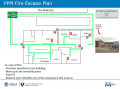 PPM Fire Escape
Plan

First Aid
- There is a FIRST AID Supply Cabinet in our Kitchen Area.
- FIRST AID Kits are available in four areas: the Kitchen, Metal Shop, Wood Shop and CNC Room.
-
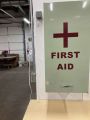 FIRST AID
Supply Cabinet -
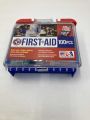 FIRST AID
Kit


Eye Wash Stations
- Emergency Eye & Face Wash Stations are mounted in four areas: the Kitchen, Wood Shop, CNC Room and Vented Room.
-
 Emergency
Eye & Face Wash
Station

Personal Protective Equipment (PPE)
- Wear protective equipment in all Wood and Metal Shop Areas.
- Wear gloves when using Isopropyl Alcohol and other cleaners.
- Gloves should not be worn when using powered equipment (saws, jointers, drills, or other equipment). Leather gloves can be worn for handling materials, but not when operating machinery.
-
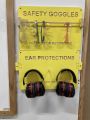 Personal Protective Equipment (PPE)

Hazardous Chemicals
- All hazardous chemicals must be stored in the yellow hazardous chemical storage cabinet located in the Vented Room.
- Review the Safety Data Sheet (SDS) information of unknown products before use.
- SDS information is available via this spreadsheet.
- Do not bring dangerous chemicals to the makerspace.
- Spray paint, stains, and other approved items must be stored in the hazardous chemical storage cabinet in the Vented Room.
- Please DO NOT paint indoors.
-
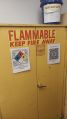 Flammables Cabinet
in the Vented Room

Other Hazards
- Avoid placing uncovered (extension) cords, hoses, cables, or wires across the floors of our shops.
Impairment
- The use of PPM equipment requires you to be alert, attentive, and focused.
- Do not use any PPM work area, or any PPM tools, if you are under the influence of drugs or alcohol.
Classes and Training
New Member Orientation
Area Captain
- Lisa MacNicol (BOSSLASER)
- View all PPM Area Captains
Area Captain Duties
Classes
- Pikes Peak Makerspace announces its Upcoming events, including classes, on Meetup
Training
- Lisa MacNicol (BOSSLASER)
- DO NOT cut materials with PVC on either laser, this will release chlorine gas which is toxic.
- Boss Laser Safety
- ● NEVER cut PVC (When in doubt, error on the side of caution)
- ● NEVER leave the laser unattended while it is running (Stay in the building)
- ● Use only approved materials
- ● Leave lid closed for a few moments after your job is completed
- ● Avoid using 100% power
- ● Avoid reflective material
- ● Keep work area interior and exterior clean
- ● Keep the exhaust fan and chiller running while the laser is in use
- ● Make sure Zing Laser isn’t running before turning off fan
- ALWAYS ensure the work area interior and exterior is clean before and after your work.
Watch these videos on LightBurn BEFORE (BOSSLASER) CLASS!- Pikes Peak Makerspace Boss Laser Intro -- external link to PPM YouTube channel
-
Boss Laser Orientation class handout.pdf
- Be sure to log your Boss Laser job using the new SIGN-IN SHEET
Common Issues (Boss Laser Orientation)
- Didn’t cut through?
- It is a good practice to leave the workpiece in position and inspect for through cut before moving it.
- You can often close the lid, run an additional pass, and get all the way through.
- You should not start your job until you are confident about your settings by doing multiple tests.
Taking too long?
- Check settings for “flood fill” or “fill shapes individually”. Use the preview feature to know if that will help.
Events
-
TOSC tour
(2021-11-24)

Additional Help
- Use the PPM Slack channel #laser-cutter
 The following pages contain historical information. The pages are provided for reference only.
• Laser Cutting Material Table (15:41, 21 May 2015)
• Laser Cutting Acrylic (16:31, 24 November 2015)
Equipment Lists
BOSSLASER
| Picture | Item | Manufacturer | Model Number |
Estimated Value |
Manual | Owner | Status | Problem Description |
 |
Boss 150 Watt
CO2 Laser |
Boss | LS-3655 | $20,000 |
Operators Manual | PPM | working (12/28/21) | |
 |
OUTFEED TABLE | Mike Mike | PPM | working (12/28/21) | ||||
 |
Industrial Chiller | S&A | CW‑5000DG | Maintenance Manual | PPM | working (12/28/21) | ||
 |
Compressor | PPM | ||||||
 |
Computer | HP | h8-1117c | $250 |
PPM | working (12/28/21) | ||
| 27" Monitor | Dell | $100 |
PPM | working (12/28/21) | ||||
| rotary attachment for Boss Laser | PPM | ? | ||||||
| Picture | Item | Manufacturer | Model Number |
Estimated Value |
Manual | Owner | Status | Problem Description |
Hand Tools
- Laser Area hand tools should be marked with red tape or paint.
- Return all tools to their proper location after use. This rule applies to all areas of our Makerspace.
Donations Received
Wish List
Benefits and Policies
- PPM members enjoy discounts at the following local merchants:
- (bring proof of PPM membership)
| Website | Benefit | Address |
|---|---|---|
| Woodcraft of Colorado Springs | 10% discount | 4438 Austin Bluffs Parkway |
| CO Lumber Specialties | 10% discount | 3636 Stone Avenue |
| GENERAL AIR | 10% discount | 3031 N Nevada Ave. |
| ACE Hardware Uintah Gardens | 10% discount | 1830 W Uintah Street |
Equipment Reservations
Materials
- DO NOT cut materials with PVC on either laser, this will release chlorine gas which is toxic.
- Avoid reflective material.
- Donate for "Wood Sheet for Laser" via PayPal: bit.ly/ppmstuff
- Or, leave donations in a black payment box, or use a QR code.
Red Tags
Scrap and Trash
- Trash day is TUESDAY (Extra pickups can be called from Waste Connections for around $75)
- Recycling day is MONDAY (96 gallon tote should be placed out back by the dumpster)
- Single Stream Recycling provided by Waste Connections. Paper, cardboard, cans, glass, and one time use plastics.
- Empty interior trash cans into our dumpster at the back (south side) of the building.
- Always leave the space better than you found it.
Software
Design Software
- Adobe Illustrator (Windows 10 and Macintosh)
- Adobe Photoshop (Windows 10 and Macintosh)
- Inkscape (multi-platform)
- Procreate (Tips, Training and Meetups)
Printing Software
- LightBurn (for BOSSLASER)
Member Showcase
Boss Laser Photo Gallery
-
Garden of the Gods
48"x24"
(by Robbie Cochran) -
Station 11 Battalion 2
backlit district map
(by Joey Callahan) -
Laser engraved panels
(by Uncle Mike Mike) -
INGLOURIOUS BASTERDS
minimalist wall art
(by Ben Severson) -
THE IRON GIANT
minimalist wall art
14"x24"
(by Ben Severson)


See Also
Laser -- Epilog
Curated Links
- ImagR -- Prepare your image for laser engraving
Other Fun Stuff
Search the PPM Wiki — include Content pages as well as Multimedia.
Contact Us if you cannot find your answer here on our Wiki or if you notice any outdated information.