Mall Map: Difference between revisions
| Line 38: | Line 38: | ||
| style="vertical-align:middle;" |Picture | | style="vertical-align:middle;" |Picture | ||
|Item | |Item | ||
|Manufacturer | |Manufacturer | ||
| | |Model | ||
|- | |- | ||
|[[File:VIZIO E320VL kiosk.jpg|center|frameless|145x145px|link=https://wiki.pikespeakmakerspace.org/index.php/File:VIZIO_E320VL_kiosk.jpg]] | |[[File:VIZIO E320VL kiosk.jpg|center|frameless|145x145px|link=https://wiki.pikespeakmakerspace.org/index.php/File:VIZIO_E320VL_kiosk.jpg]] | ||
| Line 46: | Line 46: | ||
[[File:Level 1 badge.png|alt=Level 1 badge|left|frameless|45x45px|link=https://wiki.pikespeakmakerspace.org/index.php/File:Level_1_badge.png]] | [[File:Level 1 badge.png|alt=Level 1 badge|left|frameless|45x45px|link=https://wiki.pikespeakmakerspace.org/index.php/File:Level_1_badge.png]] | ||
|'''VIZIO''' | |'''VIZIO''' | ||
'''E320VL | |'''E320VL''' | ||
|- | |- | ||
| | | | ||
Latest revision as of 17:55, 25 August 2026
The Pikes Peak Makerspace (PPM) "Mall Map" is a completely original and entertaining kiosk developed by many of our members.
We use it to inform both members and visitors about the equipment we offer at PPM.
Additionally, it is movable and can be temporarily used at various events.

Both members and visitors are welcome to check it out while at PPM.
(735 East Pikes Peak Avenue, Colorado Springs, Colorado)
The code and documentation is under version control
on GitHub: https://github.com/PikesPeakMakerspace/welcome-display

Ongoing Tasks
Volunteers are needed
- Help keep the content current.
- Continually test that the system is understood and useful to users.
Equipment Lists
| Picture | Item | Manufacturer | Model |
 |
32" 720p HDMI Monitor
with VR15 remote  |
VIZIO | E320VL |
Picture Gallery
-
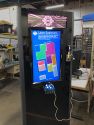 Mall Map (PPM Kiosk)
"After" -
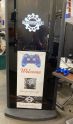 Mall Map (PPM Kiosk)
with prototype poster -
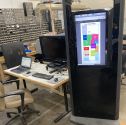 Mall Map (PPM Kiosk)
with old map -
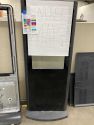 Mall Map In Progress
"Before" -
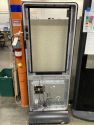 Mall Map
frame only -
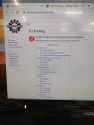 Mall Map In Progress
 -
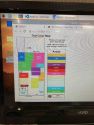 Mall Map
original map only


Behind the Scenes
- Our Mall Map requires power for the large display and Raspberry Pi.
- It uses an optional Internet connection for software updates.
- It is a bit tall and heavy. (But moving it does not require a forklift, at least.)
- The first map, which was originally built in Adobe Illustrator and Adobe InDesign, detected mouse clicks, and then launched pages from our wiki
- Our current map, a more stylized version of our 'space, accepts button and joystick input from a wired Xbox game controller and then loads data from a JSON file on the Raspberry Pi.
- An Arduino controls the lights of the color-coordinated upper display. This laser-engraved panel reinforces the color of the selected tool area! (See our "After" pic in the Picture Gallery.)
Original Contributors
Sixteen PPM members contributed
- Ben S, Chris M, Chris S, Drew J, Greg B, Joey C, John N, Les F, Lisa M, Marvin H, Mathew P, Nate R, Pavan D, Ross H, Trevor B, and Warren J made this project successful.
Additional Help
Use the PPM Slack channel #computing
Note that we have a Slack channel (#job-board) for members to post, discuss, or accept job opportunities either within PPM or from the community.
Search the PPM Wiki — include Content pages as well as Multimedia.
Contact Us if you cannot find your answer here on our Wiki or if you notice any outdated information.