Sandbox - 01
Pikes Peak Makerspace (PPM) has just received a donated Roland TruVIS VG3-540 Inkjet Printer Cutter, and supplies, and dedicated computer!
No reservations will be required for our Roland TruVIS printer at this time, it is "first-come, first-served".
However, be sure to log your printing job using the Printer Usage Form.

Our Large Format Printing (LFP) area consists mostly of Level 2 equipment.
Additional PPM training is required to use any of our Level 2 equipment.
Links to related PPM Wiki pages:
Contact Us if you cannot find your answer here on our Wiki or if you notice any outdated information.
Classes
- PPM announces its Upcoming events, including classes, on Meetup
- To help out with our new Roland Printer, post your ideas/comments on our Slack #printer-suite.
Training
- No reservations will be required for our Roland TruVIS printer at this time, it is "first-come, first-served". However, be sure to log your printing job using the Printer Usage Form.
-
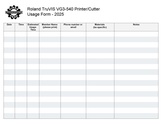 Roland TruVIS Usage Form.pdf
Tips
- ☐
Equipment Lists
Roland Large Format Printer Cutter
| Picture | Item | Manufacturer | Model Number |
Resources | Owner |
| picture of Roland large format printer | Large Format
Printer Cutter (54 inch wide)  |
ROLAND | TruVIS VG3-540 | website | PPM |
☐ Do not expect files on the computers to be saved, use your own thumb drive or cloud backup.
Hand Tools
- ☐ Return all tools to their proper location after use.
- ☐ This rule applies to all areas of our Makerspace.
Policies
Materials
- SCAN OUR QR CODE (Cheddar Up) TO PAY FOR USE.
- If paying by cash, leave donations in a black payment box after login in Cheddar Up.
- 14", 24", and 30" stretcher boards mounting canvas prints, cost TBD.
Red Tags
- If equipment needs repairs, place a Red Tag on it and report it via the Pikes Peak Makerspace Slack channel #red-tag-issues
- This advises others on the malfunctioning equipment and ensures that actions can be taken to service/repair the equipment.
Related Software
Printing Software
Design Software
Member Showcase
-
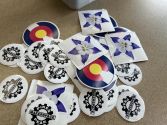 stickers printed on our
new Roland printer
(01/26/25)


Additional Help
Links to related PPM Wiki pages:
- Use the #printer-suite channel in Slack!
- List of all PPM Slack channels
- Note that we have a Slack channel (#job-board) for members to post, discuss, or accept job opportunities either within PPM or from the community.
Search the PPM Wiki — include Content pages as well as Multimedia.
Contact Us if you cannot find your answer here on our Wiki or if you notice any outdated information.