Large Format Printing: Difference between revisions
No edit summary |
No edit summary |
||
| Line 8: | Line 8: | ||
Additional training is required to use our Level 2 equipment. | Additional training is required to use our Level 2 equipment. | ||
<br> | <br> | ||
{{Template:Safety}} | <br>{{Template:Safety}} | ||
==Classes and Training== | ==Classes and Training== | ||
| Line 24: | Line 22: | ||
===Training=== | ===Training=== | ||
:*'''After loading a new roll of material, be sure the roll spins freely. (Be sure it doesn't rub against the printer.)''' | :*'''After loading a new roll of material, be sure the roll spins freely. (Be sure it doesn't rub against the printer.)''' | ||
:*Use the small power button on the front, lower left of the printer for an "Emergency Stop", if necessary. | :* Use the small power button on the front, lower left of the printer for an "Emergency Stop", if necessary. | ||
:*Otherwise, to clear the printer, cycle the power using the power switch in the back, next to the power cord. | :*Otherwise, to clear the printer, cycle the power using the power switch in the back, next to the power cord. | ||
:*Plain paper is recyclable. (Photo paper and canvas are not.) | :*Plain paper is recyclable. (Photo paper and canvas are not.) | ||
:*Be sure to log your printing job using the new Printer Usage Form. | :* Be sure to log your printing job using the new Printer Usage Form. | ||
<gallery> | <gallery> | ||
File:Large Format Printer Usage Form.pdf|alt=Large Format Printer Usage Form|<center>Large Format Printer Usage Form.pdf</center> | File:Large Format Printer Usage Form.pdf|alt=Large Format Printer Usage Form|<center>Large Format Printer Usage Form.pdf</center> | ||
File:Hp 510 Inkjet Printer.jpg|alt=hp 510 Inkjet Printer|<center>HP Designjet 510<br>(stock photo)</center> | |||
File:Hp 510 front power switch.jpg|<center>HP Designjet 510<br>front power button</center> | File:Hp 510 front power switch.jpg|<center>HP Designjet 510<br>front power button</center> | ||
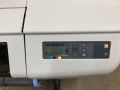
File:HP Designjet 510 panel.jpg|alt=HP Designjet 510 display|<center>HP Designjet 510<br>display</center> | File:HP Designjet 510 panel.jpg|alt=HP Designjet 510 display|<center>HP Designjet 510<br>display</center> | ||
File:HP Designjet 510 load paper.jpg|alt=load paper steps (6)|<center>HP Designjet 510<br>load paper steps (6)</center> | File:HP Designjet 510 load paper.jpg|alt=load paper steps (6)|<center>HP Designjet 510<br>load paper steps (6)</center> | ||
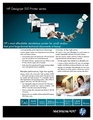
File:Hp 510 brochure.pdf|alt=HP Designjet 510 brochure|<center>HP Designjet 510<br>brochure.pdf</center> | File:Hp 510 brochure.pdf|alt=HP Designjet 510 brochure|<center>HP Designjet 510<br>brochure.pdf</center> | ||
</gallery> | </gallery> | ||
| Line 48: | Line 47: | ||
:'''-''' The media profile for "Canvas" does not allow cutting at the end of the job (or even manually), just use the scissors instead. | :'''-''' The media profile for "Canvas" does not allow cutting at the end of the job (or even manually), just use the scissors instead. | ||
:'''-''' If printer reports "Print Head Path Error 2", check the (Illustrator) file to see if it has elements that need to be trimmed to fit within the artboard. | :'''-''' If printer reports "Print Head Path Error 2", check the (Illustrator) file to see if it has elements that need to be trimmed to fit within the artboard. | ||
===For Additional Help === | ===For Additional Help=== | ||
:Use the #printer-suite or #computing channels in [https://bit.ly/ppmslack Slack!] | :Use the #printer-suite or #computing channels in [https://bit.ly/ppmslack Slack!] | ||
:[[How To Slack#Channel Names and Descriptions|'''List of all PPM Slack channels''']] | :[[How To Slack#Channel Names and Descriptions|'''List of all PPM Slack channels''']] | ||
| Line 118: | Line 117: | ||
===[[Wish List#Large Format Printing|Wish List]]=== | ===[[Wish List#Large Format Printing|Wish List]]=== | ||
Pikes Peak Makerspace is a 501(c)(3) non-profit organization, so we can provide a receipt for any donations you make. | Pikes Peak Makerspace is a 501(c)(3) non-profit organization, so we can provide a receipt for any donations you make. | ||
==Benefits and Policies == | ==Benefits and Policies== | ||
{{Member Benefits}} | {{Member Benefits}} | ||
| Line 129: | Line 128: | ||
:14", 24", and 30" (Fredrix brand) stretcher boards, stretcher tool and stapler for mounting canvas prints, cost TBD. | :14", 24", and 30" (Fredrix brand) stretcher boards, stretcher tool and stapler for mounting canvas prints, cost TBD. | ||
===Large Format Printing Supplies === | ===Large Format Printing Supplies=== | ||
{| class="wikitable" | {| class="wikitable" | ||
|- | |- | ||
| Line 139: | Line 138: | ||
!'''Quantity''' | !'''Quantity''' | ||
!'''Recommendation''' | !'''Recommendation''' | ||
!Date | ! Date | ||
|- | |- | ||
|'''HP Everyday''' | |'''HP Everyday''' | ||
| Line 156: | Line 155: | ||
| | | | ||
|36inx100ft | |36inx100ft | ||
|2 in | | 2 in | ||
|<center>2 | |<center>2 | ||
(1 unopened) | (1 unopened) | ||
| Line 313: | Line 312: | ||
==Software== | ==Software== | ||
===Design Software === | ===Design Software=== | ||
:[[Adobe Illustrator Tips|'''Adobe Illustrator''']] | :[[Adobe Illustrator Tips|'''Adobe Illustrator''']] | ||
:[[Adobe Photoshop Tips|'''Adobe Photoshop''']] | :[[Adobe Photoshop Tips|'''Adobe Photoshop''']] | ||
| Line 322: | Line 321: | ||
:[[Procreate app Tips|'''Procreate''']] | :[[Procreate app Tips|'''Procreate''']] | ||
===Printing Software === | ===Printing Software=== | ||
:'''Adobe Acrobat''' | :'''Adobe Acrobat''' | ||
:'''[https://support.apple.com/guide/preview/welcome/mac Preview]''' -- Print directly from Macintosh applications, including Preview | :'''[https://support.apple.com/guide/preview/welcome/mac Preview]''' -- Print directly from Macintosh applications, including Preview | ||
| Line 351: | Line 350: | ||
:'''[https://support.hp.com/us-en/product/hp-designjet-510-printer-series/3737526/model/3737531/document/c01614253 HP Designjet 510 Series Printers - Specifications]''' | :'''[https://support.hp.com/us-en/product/hp-designjet-510-printer-series/3737526/model/3737531/document/c01614253 HP Designjet 510 Series Printers - Specifications]''' | ||
==Other Fun Stuff == | ==Other Fun Stuff== | ||
Links to other sites (external links): | Links to other sites (external links): | ||
:'''Consider [[wikipedia:Hofstadter's_law|Hofstadter's law]]''' | :'''Consider [[wikipedia:Hofstadter's_law|Hofstadter's law]]''' | ||
Revision as of 22:02, 23 May 2023

Pikes Peak Makerspace (PPM) is dedicated to supporting our maker community in their creative process by providing shared space, shared tools, software, materials and a knowledge base to turn their ideas into reality.
The Large Format Printing Area at Pikes Peak Makerspace (PPM) consists mostly of Level 2 equipment.
Additional training is required to use our Level 2 equipment.
==Safety First==
Members must know the following information:
- In case of emergency, call 911.
- Our physical location is:
- 735 East Pikes Peak Avenue
- Colorado Springs, CO 80903
-
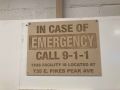 IN CASE OF
EMERGENCY
sign

PPM Fire Escape Plan
- Fire Escape Plan maps are posted throughout the Makerspace.
- There are 7 fire extinguishers on the fire escape plan map.
- Review the PPM Fire Escape Plan for locations.
-
 PPM Emergency
Evacuation Plan.pdf -
 PPM Fire
Prevention Plan.pdf -
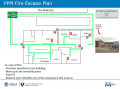 PPM Fire Escape
Plan

First Aid
- There is a FIRST AID Supply Cabinet in our Kitchen Area.
- FIRST AID Kits are available in four areas: the Kitchen, Metal Shop, Wood Shop and CNC Room.
-
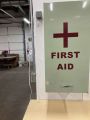 FIRST AID
Supply Cabinet -
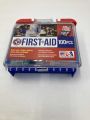 FIRST AID
Kit


Eye Wash Stations
- Emergency Eye & Face Wash Stations are mounted in four areas: the Kitchen, Wood Shop, CNC Room and Vented Room.
-
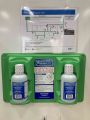 Emergency
Eye & Face Wash
Station

Personal Protective Equipment (PPE)
- Wear protective equipment in all Wood and Metal Shop Areas.
- Wear gloves when using Isopropyl Alcohol and other cleaners.
- Gloves should not be worn when using powered equipment (saws, jointers, drills, or other equipment). Leather gloves can be worn for handling materials, but not when operating machinery.
-
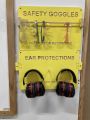 Personal Protective Equipment (PPE)

Hazardous Chemicals
- All hazardous chemicals must be stored in the yellow hazardous chemical storage cabinet located in the Vented Room.
- Review the Safety Data Sheet (SDS) information of unknown products before use.
- SDS information is available via this spreadsheet.
- Do not bring dangerous chemicals to the makerspace.
- Spray paint, stains, and other approved items must be stored in the hazardous chemical storage cabinet in the Vented Room.
- Please DO NOT paint indoors.
-
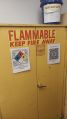 Flammables Cabinet
in the Vented Room

Other Hazards
- Avoid placing uncovered (extension) cords, hoses, cables, or wires across the floors of our shops.
Impairment
- The use of PPM equipment requires you to be alert, attentive, and focused.
- Do not use any PPM work area, or any PPM tools, if you are under the influence of drugs or alcohol.
Classes and Training
New Member Orientation
Area Captain -- Mathew Palfenier
- To help out with the Large Format Printer, post your ideas/comments on Slack.
Classes
- Pikes Peak Makerspace announces its Upcoming events, including classes, on Meetup
Training
- After loading a new roll of material, be sure the roll spins freely. (Be sure it doesn't rub against the printer.)
- Use the small power button on the front, lower left of the printer for an "Emergency Stop", if necessary.
- Otherwise, to clear the printer, cycle the power using the power switch in the back, next to the power cord.
- Plain paper is recyclable. (Photo paper and canvas are not.)
- Be sure to log your printing job using the new Printer Usage Form.
-
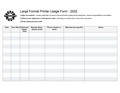
Large Format Printer Usage Form.pdf -
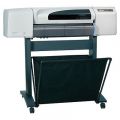
HP Designjet 510
(stock photo) -
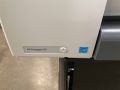
HP Designjet 510
front power button -
HP Designjet 510
display -

HP Designjet 510
load paper steps (6) -
HP Designjet 510
brochure.pdf


 The following pages contain historical information. The pages are provided for reference only.
Captured transcript of Large Format Printer Refresher video (by former PPM member Logan Henning):
Tips
- - The media profile for "Canvas" does not allow cutting at the end of the job (or even manually), just use the scissors instead.
- - If printer reports "Print Head Path Error 2", check the (Illustrator) file to see if it has elements that need to be trimmed to fit within the artboard.
For Additional Help
- Use the #printer-suite or #computing channels in Slack!
- List of all PPM Slack channels
- Note that we have a Slack channel (#job-board) for members to post, discuss, or accept job opportunities either within PPM or from the community.
Equipment Lists
Large Format Printer
| Picture | Item | Manufacturer | Model Number |
Estimated Value |
Owner |
|---|---|---|---|---|---|
 |
Large Format
4-Color Inkjet Printer  |
hp
with (416 MB memory upgrade) |
? |
PPM | |
 |
2" spindle hub
(3D-printed) |
Trevor Banks | designed by
Trevor Banks (04/12/22) |
priceless | PPM |
 |
3" to 2" spindle hub adapter
(3D-printed) |
Trevor Banks | designed by
Trevor Banks (04/16/22) |
priceless | PPM |
Number |
Value |
Hand Tools
- Use scissors to cut canvas, (the media profile "Canvas" does not allow cutting.)
- Return all tools to their proper location after use. This rule applies to all areas of our Makerspace.
Donations Received
Wish List
Pikes Peak Makerspace is a 501(c)(3) non-profit organization, so we can provide a receipt for any donations you make.
Benefits and Policies
- PPM members enjoy discounts at the following local merchants:
- (bring proof of PPM membership)
| Website | Benefit | Address |
|---|---|---|
| Woodcraft of Colorado Springs | 10% discount | 4438 Austin Bluffs Parkway |
| CO Lumber Specialties | 10% discount | 3636 Stone Avenue |
| GENERAL AIR | 10% discount | 3031 N Nevada Ave. |
| ACE Hardware Uintah Gardens | 10% discount | 1830 W Uintah Street |
Equipment Reservations
Materials
- Donate for Printing Materials: https://printing.cheddarup.com Use checkout for all payment methods.
- If paying by cash, leave donations in a black payment box after login in Cheddar Up.
- 14", 24", and 30" (Fredrix brand) stretcher boards, stretcher tool and stapler for mounting canvas prints, cost TBD.
Large Format Printing Supplies
| Item | Weight | Size | Core Size
2 or 3 in |
Quantity | Recommendation | Date |
|---|---|---|---|---|---|---|
| HP Everyday
Instant-Dry Gloss Photo Paper |
42" | 2 in | 5/12/22 | |||
| HP Everyday Blockout
Display Film |
36inx100ft | 2 in | (1 unopened) |
4/16/22 | ||
| Presentation Grade
Matte Paper |
36" | |||||
| Bright White
Bond Paper |
20lb | 30" | ||||
| Premium
Matte Paper |
47lb | 24" | ||||
| Bright White
Bond Paper |
20lb | 33" | ||||
| Bright White
Bond Paper |
20lb | 23.5" | ||||
| Heavy Weight
Coated Paper |
36" | |||||
| Bright White
Bond Paper |
20lb | 24" | ||||
| Translucent
Bond Paper |
15lb | 24" | ||||
| Off White
Bond Paper |
24" | |||||
| Bright White
Bond Paper |
20lb | 36" | ||||
| Bright White
Bond Paper |
20lb | 11" | Sell | |||
| Bright White
Bond Paper |
20lb | 11.5" | Sell | |||
| Translucent
Bond Paper |
15lb | 36" | Sell | |||
| Translucent
Bond Paper |
15lb | 48" | Sell -- too wide | |||
Red Tags
Scrap and Trash
- Trash day is TUESDAY (Extra pickups can be called from Waste Connections for around $75)
- Recycling day is MONDAY (96 gallon tote should be placed out back by the dumpster)
- Single Stream Recycling provided by Waste Connections. Paper, cardboard, cans, glass, and one time use plastics.
- Empty interior trash cans into our dumpster at the back (south side) of the building.
- Always leave the space better than you found it.
Software
Design Software
Printing Software
- Adobe Acrobat
- Preview -- Print directly from Macintosh applications, including Preview
Member Showcase
-
Large Vinyl Banner
by Debbie l Urquijo
(03/21/23) -
Abbey car show
posters -
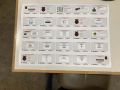
Raspberry Pi
poster -
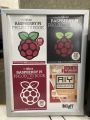
Raspberry Pi Books
poster -
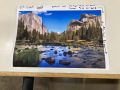
Mountains
poster -
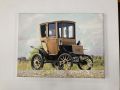
Electric car
canvas print -
MOTOMINDED
window curtains
by Chris V. -
"Record" printout
100 inches long
(October 2016)


See Also
Links to other PPM Wiki pages (internal links):
Curated Links
Links to other sites (external links):
Other Fun Stuff
Links to other sites (external links):
- Consider Hofstadter's law
Search the PPM Wiki — include Content pages as well as Multimedia.
Contact Us if you cannot find your answer here on our Wiki or if you notice any outdated information.