LightBurn Tips: Difference between revisions
Jump to navigation
Jump to search
No edit summary |
|||
| Line 3: | Line 3: | ||
{{Template:Is incomplete top banner}} | {{Template:Is incomplete top banner}} | ||
<br> | <br> | ||
LightBurn is a commercial software package for Windows, Macintosh OS, and Linux. | LightBurn is a commercial software package for Windows, Macintosh OS, and | ||
Linux. | |||
Use LightBurn to import/layout/edit or create new artwork then control your laser cutter settings like power, speed, number of passes, etc.<br> | Use LightBurn to import/layout/edit or create new artwork then control your laser cutter settings like power, speed, number of passes, etc.<br> | ||
| Line 10: | Line 11: | ||
:'''https://lightburnsoftware.com/''' | :'''https://lightburnsoftware.com/''' | ||
== Classes and Training == | ==Classes and Training== | ||
==='''[[New Member Orientation]]'''=== | ==='''[[New Member Orientation]]'''=== | ||
| Line 34: | Line 35: | ||
:'''[[Laser]]''' | :'''[[Laser]]''' | ||
== Curated Links == | ==Curated Links== | ||
:'''Watch these videos on LightBurn BEFORE (BOSSLASER) CLASS!''' | :'''Watch these videos on LightBurn BEFORE (BOSSLASER) CLASS!''' | ||
:[https://youtu.be/BkNeVjbZncc '''Lesson 1 First Time User'''] | :[https://youtu.be/BkNeVjbZncc '''Lesson 1 First Time User'''] | ||
| Line 42: | Line 43: | ||
:[https://youtu.be/1fds7JdbiSo '''LightBurn Basics #2 Text and Offsetting'''] | :[https://youtu.be/1fds7JdbiSo '''LightBurn Basics #2 Text and Offsetting'''] | ||
:[https://youtu.be/T6lQrcf2DtI '''LightBurn Basics #3 Trace Image and Weld'''] | :[https://youtu.be/T6lQrcf2DtI '''LightBurn Basics #3 Trace Image and Weld'''] | ||
==Other Fun Stuff == | ==Other Fun Stuff== | ||
:'''https://lightburnsoftware.github.io/NewDocs/TipsAndTricks.html''' | :'''https://lightburnsoftware.github.io/NewDocs/TipsAndTricks.html''' | ||
:'''https://lightburnsoftware.github.io/NewDocs/QRCodeCreator.html''' | :'''https://lightburnsoftware.github.io/NewDocs/QRCodeCreator.html''' | ||
Revision as of 15:25, 7 June 2022
Pikes Peak Makerspace (PPM) is dedicated to supporting our maker community in their creative process by providing shared space, shared tools, materials and a knowledge base to turn their ideas into reality.
Template:Is incomplete top banner
LightBurn is a commercial software package for Windows, Macintosh OS, and
Linux.
Use LightBurn to import/layout/edit or create new artwork then control your laser cutter settings like power, speed, number of passes, etc.
Developer Link
Classes and Training
New Member Orientation
Classes
- Pikes Peak Makerspace announces its Upcoming events, including classes, on Meetup
Training
-
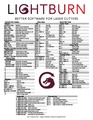
LIGHTBURN
HotKey List
Tips
- - File formats that LightBurn can import include AI, PDF, SVG, DXF, PLT, PNG, JPG, GIF, and BMP
- - LightBurn does not support the stock M2-Nano board on K40 lasers
For Additional Help
- Use the PPM Slack channels #computers or #general
- Or message our Boss Laser Captain Lisa MacNicol on Slack
See Also
- Links to other PPM Wiki pages (internal links):
- Laser
Curated Links
- Watch these videos on LightBurn BEFORE (BOSSLASER) CLASS!
- Lesson 1 First Time User
- Lesson 2 LightBurn UI Walkthrough
- Lesson 3 Cut Settings
- LightBurn Basics #1 Importing, Selection, Grouping, Movement
- LightBurn Basics #2 Text and Offsetting
- LightBurn Basics #3 Trace Image and Weld
Other Fun Stuff
- https://lightburnsoftware.github.io/NewDocs/TipsAndTricks.html
- https://lightburnsoftware.github.io/NewDocs/QRCodeCreator.html
Search the PPM Wiki — include Content pages as well as Multimedia.
Contact Us if you cannot find your answer here on our Wiki or if you notice any outdated information.