Shared Tools and Map: Difference between revisions
Jump to navigation
Jump to search
No edit summary |
No edit summary |
||
| Line 16: | Line 16: | ||
:[[Welding Area|<span style="color:#FFFFFF; background:#EB4F9C"> '''Metal Shop — Welding Area''' </span>]] | :[[Welding Area|<span style="color:#FFFFFF; background:#EB4F9C"> '''Metal Shop — Welding Area''' </span>]] | ||
: | :'''[[Vented Room]]''' | ||
: | :'''[[Shed]]''' | ||
==='''Front of shop (North part of building)'''=== | ==='''Front of shop (North part of building)'''=== | ||
Revision as of 19:52, 10 September 2026
Learn about our shared tools at Pikes Peak Makerspace (PPM).
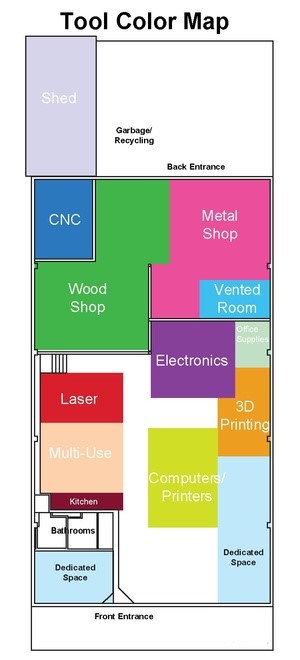
Map

Back of shop (South part of building)
Front of shop (North part of building)
PPM Equipment Levels
Shared equipment at our makerspace is categorized into three levels (1-3),
by amount of PPM training required:
- Level 1 - No training required.
PPM shared equipment that is immediately available to use by all paid PPM Members.

- Level 2 - Training required.
Equipment *buy-in* (usually just one PPM class, with a small additional fee).

- Level 3 - PPM certification required.
Under supervision of a PPM Captain, or by taking a PPM certification course.

Additional Help
Search the PPM Wiki — include Content pages as well as Multimedia.
Contact Us if you cannot find your answer here on our Wiki or if you notice any outdated information.