Sandbox - 01: Difference between revisions
| Line 134: | Line 134: | ||
'''Desktop''' | '''Desktop''' | ||
[[File:Level 1 badge.png|alt=Level 1 badge|left|frameless|45x45px]] | [[File:Level 1 badge.png|alt=Level 1 badge|left|frameless|45x45px]] | ||
|Microsoft Windows 11 Home, | |Microsoft Windows 11 Home, | ||
CorelDRAW Graphics Suite | CorelDRAW Graphics Suite | ||
VersaWorks, Inkscape | VersaWorks, Inkscape | ||
Edge | Brave, Chrome, and Edge browsers | ||
and more. | and more. | ||
|24 inch, | |24 inch, | ||
touch display | |||
|12th Gen Intel(R) | |12th Gen Intel(R) | ||
Core(TM) i5-12400T | Core(TM) i5-12400T | ||
Revision as of 18:00, 18 August 2025
Pikes Peak Makerspace (PPM) has received a donated Roland TruVIS VG3-540 Inkjet Printer Cutter, supplies, supply rack, dedicated computer, and UPS!
No reservations are available for our Roland TruVIS printer at this time, it is "first-come, first-served".
However, be sure to log your printing job using the Printer Usage Form.
Always leave the space better than you found it.

Our Large Format Printing (LFP) area consists mostly of Level 2 equipment.
Additional PPM training is required to use any of our Level 2 equipment.
Links to related PPM Wiki pages:
Contact Us if you cannot find your answer here on our Wiki or if you notice any outdated information.
Classes
- PPM announces its Upcoming classes on Meetup.com
- To help out with our Roland Printer, post your ideas/comments on our Slack ##roland-printer
Training
- No reservations are available for our Roland TruVIS printer at this time, it is "first-come, first-served".
- However, be sure to log your printing job on the Roland TruVIS Printer Usage Form.
-
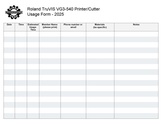 Roland TruVIS Usage Form.pdf
Tips
- ☐ Weeding is the process of removing the (vinyl) material from a design that has been cut, leaving behind only the desired artwork.
Regular Maintenance Guidelines
- From the Roland VG3-640 User's Manual
- "To use this machine under its optimal conditions, it is important to perform the following maintenance at the appropriate times on a daily basis."
| Timing | Item |
|---|---|
| Before daily operations | Print head check |
| Before daily operations | Ink mixing (white ink)
Remove just the pouch tray for the white ink, shake the pouch tray 50 times (about 20 seconds), and then reinsert this pouch tray. |
| After daily operations | Cleaning the Media Path Cleaning the Knife Carriage Roller |
| If a message appears | Cleaning around the Print Heads
(manual cleaning) |
| When the discharged fluid is ready to overflow | |
| Other maintenance items | Types and Timing of Maintenance |
Equipment Lists
Roland Large Format Printer Cutter
| Picture | Item | Manufacturer | Model Number |
Resources | Owner |
| picture of Roland large format printer | Large Format
Printer Cutter (54 inch wide)  |
ROLAND | TruVIS VG3-540 | website | PPM |
Dedicated Computer
| Computer | Software | Monitors | Processor / Graphics |
Memory / Storage |
Owner |
| HP Pavilion
All-in-One Desktop  |
Microsoft Windows 11 Home,
CorelDRAW Graphics Suite VersaWorks, Inkscape Brave, Chrome, and Edge browsers and more. |
24 inch,
touch display |
12th Gen Intel(R)
Core(TM) i5-12400T 1.80 GHz, Intel(R) UHD Graphics 730 |
12 GB,
952 GB |
PPM |
- ☐ Do not expect files on the computer or in the VersaWorks queues to be saved.
- ☐ You are responsible for your own backups.
Hand Tools
- ☐ Return all tools to their proper location after use. This rule applies to all areas of our Makerspace.
Policies
Materials
- SCAN OUR QR CODE TO PAY FOR USE (via PayPal).
Red Tags
- If equipment needs repairs, place a Red Tag on it and report it via the Pikes Peak Makerspace Slack channel #red-tag-issues
- This advises others on the malfunctioning equipment and ensures that actions can be taken to service/repair the equipment.
Related Software
Printing Software
Design Software
Member Showcase
-

Die cut sticker
for our Makerspace
(03/06/25) -
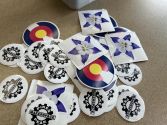
Stickers printed on our
Roland industrial printer
(01/26/25)


Additional Help
Links to related PPM Wiki pages:
Use our #roland-printer channel in Slack!
Note that we have a Slack channel (#job-board) for members to post, discuss, or accept job opportunities either within PPM or from the community.
Search the PPM Wiki — include Content pages as well as Multimedia.
Contact Us if you cannot find your answer here on our Wiki or if you notice any outdated information.