Large Format Printing: Difference between revisions
Jump to navigation
Jump to search
No edit summary |
|||
| Line 1: | Line 1: | ||
[[File:Large Format Printer Area.jpg|alt=Large Format Printer Area|thumb|300x300px|'''Large Format Printer | [[File:Large Format Printer Area.jpg|alt=Large Format Printer Area|thumb|300x300px|'''Large Format Printer''']] | ||
[[File:Training Level 2 icon.pdf|alt=Training Level 2 icon|frameless]]'''The Large Format Printing Area at Pikes Peak Makerspace consists mostly of Level 2 equipment'''. | [[File:Training Level 2 icon.pdf|alt=Training Level 2 icon|frameless]]'''The Large Format Printing Area at Pikes Peak Makerspace consists mostly of Level 2 equipment'''. | ||
| Line 11: | Line 11: | ||
:(Open) | :(Open) | ||
=== Classes === | ===Classes=== | ||
:Pikes Peak Makerspace announces its [https://www.meetup.com/pikespeakmakerspace/events '''Upcoming events, including classes, on Meetup'''] | :Pikes Peak Makerspace announces its [https://www.meetup.com/pikespeakmakerspace/events '''Upcoming events, including classes, on Meetup'''] | ||
===For Help === | ===For Help === | ||
| Line 29: | Line 29: | ||
:[[HP Designjet 5500 Series|HP DesignJet 5500 Quick Reference Guide - External Link]] | :[[HP Designjet 5500 Series|HP DesignJet 5500 Quick Reference Guide - External Link]] | ||
=== | ===Tips=== | ||
:Unfortunately, there doesn't seem to be any Windows 10 drivers for our hp 5500ps Large Format Printer. | :Unfortunately, there doesn't seem to be any Windows 10 drivers for our hp 5500ps Large Format Printer. | ||
:Our Large Format Printer does not have a Take Up Reel (TUR). | |||
==Equipment Lists== | ==Equipment Lists== | ||
| Line 156: | Line 157: | ||
|15lb | |15lb | ||
|24" | |24" | ||
| 1 | |1 | ||
| | | | ||
|- | |- | ||
| Line 208: | Line 209: | ||
|} | |} | ||
===Hand Tools=== | ===Hand Tools === | ||
:Return all tools to their proper location after use. This rule applies to all areas of our Makerspace. | :Return all tools to their proper location after use. This rule applies to all areas of our Makerspace. | ||
:A 59" [[Rotary Cutter|'''Rotary Cutter''']] is available to | :A 59" [[Rotary Cutter|'''Rotary Cutter''']] is available to trim large format printing projects. | ||
===[[Donations Received]]=== | ===[[Donations Received]]=== | ||
| Line 219: | Line 220: | ||
===[https://pikespeakmakerspace.org/reserve-equipment Equipment Reservations]=== | ===[https://pikespeakmakerspace.org/reserve-equipment Equipment Reservations]=== | ||
=== Materials === | ===Materials === | ||
:'''Cost''' | :'''Cost''' | ||
:HW Paper $1.00 per foot, Canvas $3.00 per foot | :HW Paper $1.00 per foot, Canvas $3.00 per foot | ||
| Line 231: | Line 232: | ||
==Software == | ==Software == | ||
=== Adobe | ===Design Software=== | ||
:Most PPM members use Adobe Acrobat from our [https://wiki.pikespeakmakerspace.org/index.php/Computers#Equipment_Lists Design Workstation 3] to print large format files. (Windows 7 machine is required.) | :'''Adobe Illustrator''' | ||
:Some PPM members have good luck printing from Macintosh Snow Leopard OS and its built-in application Preview. | |||
:'''Inkscape''' (cross platform) | |||
:[https://procreate.art/ '''Procreate'''] (for Apple iPad) | |||
===Printing Software=== | |||
:'''Adobe Acrobat''' | |||
::Most PPM members use Adobe Acrobat from our [https://wiki.pikespeakmakerspace.org/index.php/Computers#Equipment_Lists Design Workstation 3] to print large format files. (Windows 7 machine is required.) | |||
:: Some PPM members have good luck printing from Macintosh Snow Leopard OS and its built-in application Preview. | |||
:'''designjet 5500ps WebAccess''' | |||
==Showcase== | |||
===Photo Gallery=== | ===Photo Gallery=== | ||
:(Displayed in no particular order.) | :(Displayed in no particular order.) | ||
<gallery> | <gallery> | ||
File:Coffee mug poster.jpg|alt=Coffee mug poster|<center>Coffee mug poster</center> | File:Coffee mug<br>poster.jpg|alt=Coffee mug poster|<center>Coffee mug poster</center> | ||
File:RPi poster.jpg|alt= | File:RPi poster.jpg|alt=Raspberry Pi poster|<center>Raspberry Pi<br>poster</center> | ||
File:RPi Books poster.jpg|alt= | File:RPi Books poster.jpg|alt=Raspberry Pi Books poster|<center>Raspberry Pi Books<br>poster</center> | ||
File:3D PRINTING AREA poster.jpg|alt=3D PRINTING AREA|<center>3D PRINTING AREA poster</center> | File:3D PRINTING AREA poster.jpg|alt=3D PRINTING AREA|<center>3D PRINTING AREA poster</center> | ||
File:Digital Design poster.jpg|alt=Digital Design poster|<center>Digital Design<br>poster</center> | File:Digital Design poster.jpg|alt=Digital Design poster|<center>Digital Design<br>poster</center> | ||
| Line 250: | Line 261: | ||
</gallery> | </gallery> | ||
===PPM YouTube Channel=== | === PPM YouTube Channel=== | ||
:'''[https://www.youtube.com/channel/UCeIsImKtiNm7D_BxfG4n7zg/featured "featured" videos],''' (the YouTube "HOME" tab) | :'''[https://www.youtube.com/channel/UCeIsImKtiNm7D_BxfG4n7zg/featured "featured" videos],''' (the YouTube "HOME" tab) | ||
:[https://www.youtube.com/channel/UCeIsImKtiNm7D_BxfG4n7zg/playlists '''"Things we've built'''"], Created playlists, including 3D-printed robotic hand (2015) | :[https://www.youtube.com/channel/UCeIsImKtiNm7D_BxfG4n7zg/playlists '''"Things we've built'''"], Created playlists, including 3D-printed robotic hand (2015) | ||
Revision as of 16:19, 12 December 2021
Training Level 2 iconThe Large Format Printing Area at Pikes Peak Makerspace consists mostly of Level 2 equipment.
Additional training is required to use our Level 2 equipment.
Safety First
Members must know the following information:
- In case of emergency, call 911.
- Our physical location is:
- 735 East Pikes Peak Avenue
- Colorado Springs, CO 80903
-
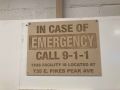 IN CASE OF
EMERGENCY
sign

PPM Fire Escape Plan
- Fire Escape Plan maps are posted throughout the Makerspace.
- There are 7 fire extinguishers on the fire escape plan map.
- Review the PPM Fire Escape Plan for locations.
-
 PPM Emergency
Evacuation Plan.pdf -
 PPM Fire
Prevention Plan.pdf -
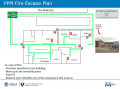 PPM Fire Escape
Plan

First Aid
- There is a FIRST AID Supply Cabinet in our Kitchen Area.
- FIRST AID Kits are available in four areas: the Kitchen, Metal Shop, Wood Shop and CNC Room.
-
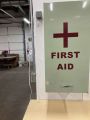 FIRST AID
Supply Cabinet -
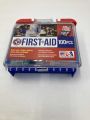 FIRST AID
Kit


Eye Wash Stations
- Emergency Eye & Face Wash Stations are mounted in four areas: the Kitchen, Wood Shop, CNC Room and Vented Room.
-
 Emergency
Eye & Face Wash
Station

Personal Protective Equipment (PPE)
- Wear protective equipment in all Wood and Metal Shop Areas.
- Wear gloves when using Isopropyl Alcohol and other cleaners.
- Gloves should not be worn when using powered equipment (saws, jointers, drills, or other equipment). Leather gloves can be worn for handling materials, but not when operating machinery.
-
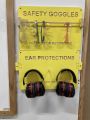 Personal Protective Equipment (PPE)

Hazardous Chemicals
- All hazardous chemicals must be stored in the yellow hazardous chemical storage cabinet located in the Vented Room.
- Review the Safety Data Sheet (SDS) information of unknown products before use.
- SDS information is available via this spreadsheet.
- Do not bring dangerous chemicals to the makerspace.
- Spray paint, stains, and other approved items must be stored in the hazardous chemical storage cabinet in the Vented Room.
- Please DO NOT paint indoors.
-
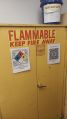 Flammables Cabinet
in the Vented Room

Other Hazards
- Avoid placing uncovered (extension) cords, hoses, cables, or wires across the floors of our shops.
Impairment
- The use of PPM equipment requires you to be alert, attentive, and focused.
- Do not use any PPM work area, or any PPM tools, if you are under the influence of drugs or alcohol.
Classes and Training
Area Captain
- (Open)
Classes
- Pikes Peak Makerspace announces its Upcoming events, including classes, on Meetup
For Help
- Use the #large-format-printer channel in Slack!
- Get started here: Large Format Printer Refresher video by Logan Henning
- "DO NOT TURN OFF / USE STANDBY INSTEAD"
-
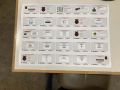
Large Format Printer
display -
Large Format Printer
steps (9)
Tips
- Unfortunately, there doesn't seem to be any Windows 10 drivers for our hp 5500ps Large Format Printer.
- Our Large Format Printer does not have a Take Up Reel (TUR).
Equipment Lists
| Picture | Item | Manufacturer | Model Number |
Estimated Value |
Manual | Owner | Status | Problem Description |
|---|---|---|---|---|---|---|---|---|
| Large Format Printer | hp | designjet 5500ps | $750 |
Yes
(pocket guide) |
PPM | working
(11/19/21) |
Black printing too heavy. (Needs new print head?) | |
| pocket guide | hp | PPM | ||||||
| Picture | Item | Manufacturer | Model Number |
Estimated Value |
Manual | Owner | Status | Problem Description |
| Item | Weight | Size | Quantity | Recommendation |
|---|---|---|---|---|
| Poster Grade Glossy Paper | 36" | 1 | Buy -- Almost Out | |
| Matte White Canvas | 35" | 1 | Buy -- Almost Out | |
| Presentation Grade Matte Paper | 36" | 1 | ||
| Bright White Bond Paper | 20lb | 30" | 1 | |
| Premium Matte Paper | 47lb | 24" | 1 | |
| Bright White Bond Paper | 20lb | 33" | 1 | |
| Bright White Bond Paper | 20lb | 23.5" | 3 | |
| Heavy Weight Coated Paper | 36" | 1 | ||
| Bright White Bond Paper | 20lb | 24" | 2 | |
| Translucent Bond Paper | 15lb | 24" | 1 | |
| Off White Bond Paper | 24" | 1 | ||
| Bright White Bond Paper | 20lb | 36" | 1 | |
| Bright White Bond Paper | 20lb | 11" | 4 | Sell |
| Bright White Bond Paper | 20lb | 11.5" | 2 | Sell |
| Translucent Bond Paper | 15lb | 36" | 6 | Sell |
| Translucent Bond Paper | 15lb | 48" | 2 | Sell |
| Item | Weight | Size | Quantity | Recommendation |
Hand Tools
- Return all tools to their proper location after use. This rule applies to all areas of our Makerspace.
- A 59" Rotary Cutter is available to trim large format printing projects.
Donations Received
Wish List
Policies
Equipment Reservations
Materials
- Cost
- HW Paper $1.00 per foot, Canvas $3.00 per foot
- Donate for Materials: bit.ly/ppmstuff (use "Other" drop down menu)
- Or, leave donations in a black payment box, or use a QR code.
- Help Us Keep Stocked Up!
- PPM members enjoy discounts at the following local merchants:
- (bring proof of PPM membership)
| Website | Benefit | Address |
|---|---|---|
| Woodcraft of Colorado Springs | 10% discount | 4438 Austin Bluffs Parkway |
| CO Lumber Specialties | 10% discount | 3636 Stone Avenue |
| GENERAL AIR | 10% discount | 3031 N Nevada Ave. |
| ACE Hardware Uintah Gardens | 10% discount | 1830 W Uintah Street |
Scrap and Trash
- Trash day is TUESDAY (Extra pickups can be called from Waste Connections for around $75)
- Recycling day is MONDAY (96 gallon tote should be placed out back by the dumpster)
- Single Stream Recycling provided by Waste Connections. Paper, cardboard, cans, glass, and one time use plastics.
- Empty interior trash cans into our dumpster at the back (south side) of the building.
- Always leave the space better than you found it.
Software
Design Software
- Adobe Illustrator
- Inkscape (cross platform)
- Procreate (for Apple iPad)
Printing Software
- Adobe Acrobat
- Most PPM members use Adobe Acrobat from our Design Workstation 3 to print large format files. (Windows 7 machine is required.)
- Some PPM members have good luck printing from Macintosh Snow Leopard OS and its built-in application Preview.
- designjet 5500ps WebAccess
Showcase
Photo Gallery
- (Displayed in no particular order.)
-
Raspberry Pi
poster -
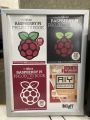
Raspberry Pi Books
poster -
3D PRINTING AREA poster -
Digital Design
poster -
Abbey car show
posters -
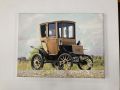
Electric car
poster -
CLEAN WORKSPACE poster -
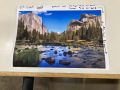
Mountains
poster


.jpg)


PPM YouTube Channel
- "featured" videos, (the YouTube "HOME" tab)
- "Things we've built", Created playlists, including 3D-printed robotic hand (2015)