Large Format Printing: Difference between revisions
| Line 42: | Line 42: | ||
!'''Estimated Value''' | !'''Estimated Value''' | ||
!'''Manual''' | !'''Manual''' | ||
!'''Owner''' | !'''Owner''' | ||
!'''Status''' | !'''Status''' | ||
| Line 59: | Line 57: | ||
|Yes | |Yes | ||
(pocket guide) | (pocket guide) | ||
|PPM | |PPM | ||
|working | |working | ||
| Line 68: | Line 65: | ||
|'''pocket guide''' | |'''pocket guide''' | ||
|hp | |hp | ||
| | | | ||
| | | | ||
| Line 75: | Line 71: | ||
| | | | ||
| | | | ||
|- | |||
|'''Picture''' | |||
|'''Item''' | |||
|'''Manufacturer''' | |||
|'''Model''' | |||
'''Number''' | |||
|'''Estimated Value''' | |||
|'''Manual''' | |||
|'''Owner''' | |||
|'''Status''' | |||
!'''Problem''' | |||
'''Description''' | |||
|} | |} | ||
[[File:Wide Format Supplies cart.jpg|thumb|'''Large Format Printing Supplies''']] | [[File:Wide Format Supplies cart.jpg|thumb|'''Large Format Printing Supplies''']] | ||
| Line 203: | Line 211: | ||
|} | |} | ||
= | ===Hand Tools=== | ||
==Hand Tools== | |||
Return all tools to their proper location after use. This rule applies to all areas of our Makerspace. | Return all tools to their proper location after use. This rule applies to all areas of our Makerspace. | ||
A 59" [[Rotary Cutter]] is available to use for large format printing projects. | A 59" [[Rotary Cutter]] is available to use for large format printing projects. | ||
===[[Donations Received]]=== | |||
===[[Wish List]]=== | |||
==Policies== | ==Policies== | ||
=== Materials=== | === Materials=== | ||
Revision as of 16:59, 2 December 2021
Training Level 2 iconThe Large Format Printing Area at Pikes Peak Makerspace consists mostly of Level 2 equipment.
Additional training is required to use our Level 2 equipment.
Safety First
Members must know the following information:
- In case of emergency, call 911.
- Our physical location is:
- 735 East Pikes Peak Avenue
- Colorado Springs, CO 80903
-
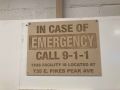 IN CASE OF
EMERGENCY
sign

PPM Fire Escape Plan
- Fire Escape Plan maps are posted throughout the Makerspace.
- There are 7 fire extinguishers on the fire escape plan map.
- Review the PPM Fire Escape Plan for locations.
-
 PPM Emergency
Evacuation Plan.pdf -
 PPM Fire
Prevention Plan.pdf -
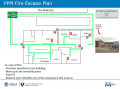 PPM Fire Escape
Plan

First Aid
- There is a FIRST AID Supply Cabinet in our Kitchen Area.
- FIRST AID Kits are available in four areas: the Kitchen, Metal Shop, Wood Shop and CNC Room.
-
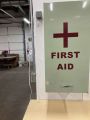 FIRST AID
Supply Cabinet -
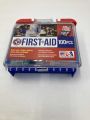 FIRST AID
Kit


Eye Wash Stations
- Emergency Eye & Face Wash Stations are mounted in four areas: the Kitchen, Wood Shop, CNC Room and Vented Room.
-
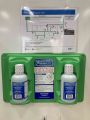 Emergency
Eye & Face Wash
Station

Personal Protective Equipment (PPE)
- Wear protective equipment in all Wood and Metal Shop Areas.
- Wear gloves when using Isopropyl Alcohol and other cleaners.
- Gloves should not be worn when using powered equipment (saws, jointers, drills, or other equipment). Leather gloves can be worn for handling materials, but not when operating machinery.
-
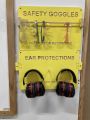 Personal Protective Equipment (PPE)

Hazardous Chemicals
- All hazardous chemicals must be stored in the yellow hazardous chemical storage cabinet located in the Vented Room.
- Review the Safety Data Sheet (SDS) information of unknown products before use.
- SDS information is available via this spreadsheet.
- Do not bring dangerous chemicals to the makerspace.
- Spray paint, stains, and other approved items must be stored in the hazardous chemical storage cabinet in the Vented Room.
- Please DO NOT paint indoors.
-
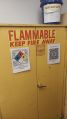 Flammables Cabinet
in the Vented Room

Other Hazards
- Avoid placing uncovered (extension) cords, hoses, cables, or wires across the floors of our shops.
Impairment
- The use of PPM equipment requires you to be alert, attentive, and focused.
- Do not use any PPM work area, or any PPM tools, if you are under the influence of drugs or alcohol.
Classes and Training
Area Captain
(Open)
Classes
Pikes Peak Makerspace announces its Upcoming events, including classes, on Meetup
For Help
Use the #large-format-printer channel in Slack!
Get started here: Large Format Printer Refresher video by Logan Henning
"DO NOT TURN OFF / USE STANDBY INSTEAD"
-
Large Format Printer
display -
Large Format Printer
steps (9)
HP DesignJet 5500 Users Guide - External Link
HP DesignJet 5500 Quick Reference Guide - External Link
Tip
A Windows 7 machine is required to print to our hp 5500ps Large Format Printer. (There are no Windows 10 drivers.)
Equipment Lists
| Picture | Item | Manufacturer | Model
Number |
Estimated Value | Manual | Owner | Status | Problem
Description |
|---|---|---|---|---|---|---|---|---|
| Large Format Printer | hp | designjet 5500ps | $750 | Yes
(pocket guide) |
PPM | working
(11/19/21) |
||
| pocket guide | hp | PPM | ||||||
| Picture | Item | Manufacturer | Model
Number |
Estimated Value | Manual | Owner | Status | Problem
Description |
| Item | Weight | Size | Quantity | Recommendation |
|---|---|---|---|---|
| Poster Grade Glossy Paper | 36" | 1 | Buy -- Almost Out | |
| Matte White Canvas | 35" | 1 | Buy -- Almost Out | |
| Presentation Grade Matte Paper | 36" | 1 | ||
| Bright White Bond Paper | 20lb | 30" | 1 | |
| Premium Matte Paper | 47lb | 24" | 1 | |
| Bright White Bond Paper | 20lb | 33" | 1 | |
| Bright White Bond Paper | 20lb | 23.5" | 3 | |
| Heavy Weight Coated Paper | 36" | 1 | ||
| Bright White Bond Paper | 20lb | 24" | 2 | |
| Translucent Bond Paper | 15lb | 24" | 1 | |
| Off White Bond Paper | 24" | 1 | ||
| Bright White Bond Paper | 20lb | 36" | 1 | |
| Bright White Bond Paper | 20lb | 11" | 4 | Sell |
| Bright White Bond Paper | 20lb | 11.5" | 2 | Sell |
| Translucent Bond Paper | 15lb | 36" | 6 | Sell |
| Translucent Bond Paper | 15lb | 48" | 2 | Sell |
| Item | Weight | Size | Quantity | Recommendation |
Hand Tools
Return all tools to their proper location after use. This rule applies to all areas of our Makerspace.
A 59" Rotary Cutter is available to use for large format printing projects.
Donations Received
Wish List
Policies
Materials
Cost
HW Paper $1.00 per foot, Canvas $3.00 per foot
Donate for Materials: bit.ly/ppmstuff (use "Other" drop down menu)
Or, leave donations in a black payment box, or use a QR code.
Help Us Keep Stocked Up!
PPE
N/A
Scrap and Trash
Please recycle plain paper.
Software
Use either Illustrator or Acrobat from our Design Workstation 3 to print large format files. (Windows 7 machine is required.)
Adobe Illustrator
Adobe Acrobat
Showcase
Photo Gallery
(Displayed in no particular order.)
-

Coffee mug poster -
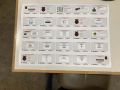
RPi poster -
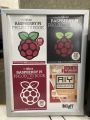
RPi Books
poster -
3D PRINTING AREA poster -
Digital Design
poster -
Abbey car show
posters -
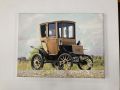
Electric car
poster -
CLEAN WORKSPACE poster -
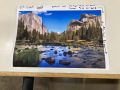
Mountains
poster


.jpg)


Other Fun Stuff
PPM YouTube Channel
"featured" videos, (the YouTube "HOME" tab)
"Things we've built", Created playlists, including 3D-printed robotic hand (2015)