:The media profile for "Hewlett-Packard/Studio Canvas" does not include cutting canvas at the end of the job, just use a pair of scissors instead.
:Our Large Format Printer does not have a Take Up Reel (TUR).
:Our Large Format Printer does not have a Take Up Reel (TUR).
Line 36:
Line 35:
:'''-''' Leave the "Language" set to "Automatic" (on the front panel: Setup > Device setup ... > Lang > Automatic),
:'''-''' Leave the "Language" set to "Automatic" (on the front panel: Setup > Device setup ... > Lang > Automatic),
:otherwise you may get the message "Error processing job / Flushing rest of job".
:otherwise you may get the message "Error processing job / Flushing rest of job".
:'''-''' The media profile for "Hewlett-Packard/Studio Canvas" does not include cutting canvas at the end of the job, just use a pair of scissors instead.
===For Help===
===For Help===
:Use the #large-format-printer channel in [https://bit.ly/ppmslack Slack!]
:Use the #large-format-printer channel in [https://bit.ly/ppmslack Slack!]
Line 254:
Line 254:
===Design Software===
===Design Software===
:'''[[Adobe Illustrator Tips|Adobe Illustrator]]''' (Windows 7, 10 and Macintosh)
:'''[[Adobe Illustrator Tips|Adobe Illustrator]]''' (Windows 7, 10 and Macintosh, not Ubuntu)
:'''[[Adobe Photoshop Tips|Adobe Photoshop]]''' (Windows 7, 10 and Macintosh)
:'''[[Adobe Photoshop Tips|Adobe Photoshop]]''' (Windows 7, 10 and Macintosh, not Ubuntu)
:'''[[Inkscape Tips|Inkscape]]'''
:'''[[Inkscape Tips|Inkscape]]'''
:[[Procreate app Tips|'''Procreate''']] (Tips, Training and Meetups)
:[[Procreate app Tips|'''Procreate''']] (Tips, Training and Meetups)
:'''Preview''' -- Some PPM members have good luck printing from Macintosh OS 10.6.8 (Snow Leopard) and its built-in application Preview.
:'''[https://support.apple.com/guide/preview/welcome/mac Preview]''' -- Some PPM members have good luck printing from Macintosh OS 10.6.8 (Snow Leopard) and its built-in application Preview.
==Member Showcase==
==Member Showcase==
Revision as of 18:45, 12 March 2022
The Large Format Printing Area at Pikes Peak Makerspace (PPM) consists mostly of Level 2 equipment.
Additional training is required to use our Level 2 equipment.
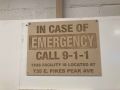
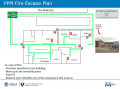
Fire Escape Plan maps are posted throughout the Makerspace.
There are 7 fire extinguishers on the fire escape plan map.
Review the PPM Fire Escape Plan for locations.
PPM Emergency Evacuation Plan.pdf
PPM Fire Prevention Plan.pdf
PPM Fire Escape Plan
First Aid
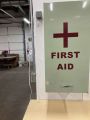
There is a FIRST AID Supply Cabinet in our Kitchen Area.
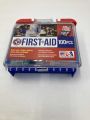
FIRST AID Kits are available in four areas: the Kitchen, Metal Shop, Wood Shop and CNC Room.
FIRST AID Supply Cabinet
FIRST AID Kit
Eye Wash Stations
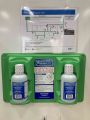
Emergency Eye & Face Wash Stations are mounted in four areas: the Kitchen, Wood Shop, CNC Room and Vented Room.
Emergency Eye & Face Wash Station
Personal Protective Equipment (PPE)
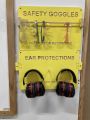
Wear protective equipment in all Wood and Metal Shop Areas.
Wear gloves when using Isopropyl Alcohol and other cleaners.
Gloves should not be worn when using powered equipment (saws, jointers, drills, or other equipment). Leather gloves can be worn for handling materials, but not when operating machinery.
Personal Protective Equipment (PPE)
Hazardous Chemicals
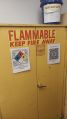
All hazardous chemicals must be stored in the yellow hazardous chemical storage cabinet located in the Vented Room.
Review the Safety Data Sheet (SDS) information of unknown products before use.
SDS information is available via this spreadsheet.
Do not bring dangerous chemicals to the makerspace.
Spray paint, stains, and other approved items must be stored in the hazardous chemical storage cabinet in the Vented Room.
Please DO NOT paint indoors.
Flammables Cabinet in the Vented Room
Other Hazards
Avoid placing uncovered (extension) cords, hoses, cables, or wires across the floors of our shops.
Impairment
The use of PPM equipment requires you to be alert, attentive, and focused.
Do not use any PPM work area, or any PPM tools, if you are under the influence of drugs or alcohol.
Classes and Training
Area Captain -- Volunteers needed
To help out with the Large Format Printer, post your ideas and comments on Slack.
Our Large Format Printer does not have a Take Up Reel (TUR).
Tips
- If printer reports "Print Head Path Error 2", check the (Illustrator) file to see if it has elements that need to be trimmed to fit within the artboard.
- Leave the "Language" set to "Automatic" (on the front panel: Setup > Device setup ... > Lang > Automatic),
otherwise you may get the message "Error processing job / Flushing rest of job".
- The media profile for "Hewlett-Packard/Studio Canvas" does not include cutting canvas at the end of the job, just use a pair of scissors instead.

 IN CASE OF
 PPM Emergency
 PPM Fire
 PPM Fire Escape
 FIRST AID
 FIRST AID

 Emergency
 Personal Protective Equipment (PPE)
 Flammables Cabinet



.jpg)


