Raspberry Pi: Difference between revisions
Jump to navigation
Jump to search
| Line 19: | Line 19: | ||
===Training=== | ===Training=== | ||
<br> | <br> | ||
===Events=== | |||
<gallery> | |||
File:Raspberry Pi Slideshow (1).png|alt=slide 1|none|thumb|<center>'''slide 1, Intro'''</center> | |||
File:Raspberry Pi Slideshow (2).png|alt=slide 2|none|thumb|<center>'''slide 2, Hardware'''</center> | |||
File:RPi poster.jpg|<center>'''Raspberry Pi<br>slideshow poster'''</center> | |||
</gallery> | |||
===Tips=== | ===Tips=== | ||
| Line 26: | Line 33: | ||
:'''Raspberry Pi 4 Model B (2018), 2000 MHz,''' WolframMark Benchmark Result: 0.24 | :'''Raspberry Pi 4 Model B (2018), 2000 MHz,''' WolframMark Benchmark Result: 0.24 | ||
===For Help=== | ===For Help === | ||
:Message in PPM Slack channel #electronics or #general | :Message in PPM Slack channel #electronics or #general | ||
:Or message Warren Jokinen on Slack | :Or message Warren Jokinen on Slack | ||
==Equipment Lists== | ==Equipment Lists== | ||
===Hardware=== | === Hardware=== | ||
:1) Raspberry Pi 3 B+ (heatsinks, no case) for "Mall Map" | :1) Raspberry Pi 3 B+ (heatsinks, no case) for "Mall Map" | ||
: | : | ||
:: large HDMI (VIZIO) display with remote | ::large HDMI (VIZIO) display with remote | ||
:: 32GB SD card (no SSD) | ::32GB SD card (no SSD) | ||
:: wired USB keyboard and mouse (Dell) | ::wired USB keyboard and mouse (Dell) | ||
:: Wi-Fi connection | ::Wi-Fi connection | ||
:: | :: | ||
| Line 44: | Line 51: | ||
:3) Raspberry Pi from Epilog engraver area | :3) Raspberry Pi from Epilog engraver area | ||
:4) Raspberry Pi from 3D Printer donation | :4) Raspberry Pi from 3D Printer donation | ||
: 5) "r pi 3 friendly" Dell monitors (quantity 5) | :5) "r pi 3 friendly" Dell monitors (quantity 5) | ||
===[[Donations Received]]=== | ===[[Donations Received]]=== | ||
| Line 51: | Line 58: | ||
==Software== | ==Software== | ||
:[https://www.raspberrypi.com/news/new-old-functionality-with-raspberry-pi-os-legacy/ 32-bit Raspberry Pi OS "Buster",] (not "Bullseye", yet) | :[https://www.raspberrypi.com/news/new-old-functionality-with-raspberry-pi-os-legacy/ '''32-bit Raspberry Pi OS "Buster",'''] (not "Bullseye", yet) | ||
:[https://www.wolfram.com/raspberry-pi/ Mathematica] free license on every Raspberry Pi | :[https://www.wolfram.com/raspberry-pi/ Mathematica] free license on every Raspberry Pi | ||
:[https://pi.processing.org/get-started/ Processing] | :[https://pi.processing.org/get-started/ Processing] | ||
| Line 61: | Line 68: | ||
<gallery> | <gallery> | ||
File:Mall Map.jpg|alt=Mall Map|<center>'''"Mall Map",<br>Work In Progress'''</center> | File:Mall Map.jpg|alt=Mall Map|<center>'''"Mall Map",<br>Work In Progress'''</center> | ||
File:RPi Workstation.jpg|alt=RPi Workstation|<center>'''RPi Workstation November 2021'''</center> | File:RPi Workstation.jpg|alt=RPi Workstation|<center>'''RPi Workstation November 2021'''</center> | ||
File:Pi photo 2.JPG|alt=Raspberry Pi computers (December 2017)|<center>'''Raspberry Pi computers (Dec 2017)'''</center> | File:Pi photo 2.JPG|alt=Raspberry Pi computers (December 2017)|<center>'''Raspberry Pi computers (Dec 2017)'''</center> | ||
| Line 67: | Line 73: | ||
File:RPi Books poster.jpg|alt=poster of RPi Books|<center>'''18x24" poster<br>of RPi Books'''</center> | File:RPi Books poster.jpg|alt=poster of RPi Books|<center>'''18x24" poster<br>of RPi Books'''</center> | ||
File:Pi photo.JPG|<center>'''posters, including Raspberry Pi'''</center> | File:Pi photo.JPG|<center>'''posters, including Raspberry Pi'''</center> | ||
</gallery> | </gallery> | ||
Revision as of 22:04, 6 March 2022

Pikes Peak Makerspace (PPM) is dedicated to supporting our maker community in their creative process by providing shared space, shared tools, materials and a knowledge base to turn their ideas into reality.
We have on hand several Raspberry Pi SBCs as well as other computers throughout our space for all our members to use
(without any additional required training).

(in our Electronics Area)
Safety First
Members must know the following information:
- In case of emergency, call 911.
- Our physical location is:
- 735 East Pikes Peak Avenue
- Colorado Springs, CO 80903
-
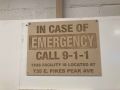 IN CASE OF
EMERGENCY
sign

PPM Fire Escape Plan
- Fire Escape Plan maps are posted throughout the Makerspace.
- There are 7 fire extinguishers on the fire escape plan map.
- Review the PPM Fire Escape Plan for locations.
-
 PPM Emergency
Evacuation Plan.pdf -
 PPM Fire
Prevention Plan.pdf -
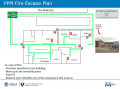 PPM Fire Escape
Plan

First Aid
- There is a FIRST AID Supply Cabinet in our Kitchen Area.
- FIRST AID Kits are available in four areas: the Kitchen, Metal Shop, Wood Shop and CNC Room.
-
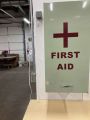 FIRST AID
Supply Cabinet -
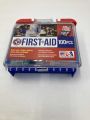 FIRST AID
Kit


Eye Wash Stations
- Emergency Eye & Face Wash Stations are mounted in four areas: the Kitchen, Wood Shop, CNC Room and Vented Room.
-
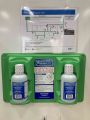 Emergency
Eye & Face Wash
Station

Personal Protective Equipment (PPE)
- Wear protective equipment in all Wood and Metal Shop Areas.
- Wear gloves when using Isopropyl Alcohol and other cleaners.
- Gloves should not be worn when using powered equipment (saws, jointers, drills, or other equipment). Leather gloves can be worn for handling materials, but not when operating machinery.
-
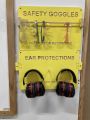 Personal Protective Equipment (PPE)

Hazardous Chemicals
- All hazardous chemicals must be stored in the yellow hazardous chemical storage cabinet located in the Vented Room.
- Review the Safety Data Sheet (SDS) information of unknown products before use.
- SDS information is available via this spreadsheet.
- Do not bring dangerous chemicals to the makerspace.
- Spray paint, stains, and other approved items must be stored in the hazardous chemical storage cabinet in the Vented Room.
- Please DO NOT paint indoors.
-
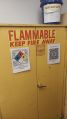 Flammables Cabinet
in the Vented Room

Other Hazards
- Avoid placing uncovered (extension) cords, hoses, cables, or wires across the floors of our shops.
Impairment
- The use of PPM equipment requires you to be alert, attentive, and focused.
- Do not use any PPM work area, or any PPM tools, if you are under the influence of drugs or alcohol.
Classes and Training
Area Captain -- Volunteers needed
Classes
- Pikes Peak Makerspace announces its Upcoming events, including classes, on Meetup
Training
Events
-
slide 1, Intro -
slide 2, Hardware -
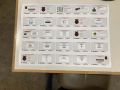
Raspberry Pi
slideshow poster

Tips
- At times the Pi 3 B+ may seem slow or unresponsive, so check the green light at the edge of the board for activity.
- Raspberry Pi 3 Model B+ (2017) 1400 MHz, WolframMark Benchmark Result: 0.14
- Raspberry Pi 400 1800 MHz, WolframMark Benchmark Result: 0.23
- Raspberry Pi 4 Model B (2018), 2000 MHz, WolframMark Benchmark Result: 0.24
For Help
- Message in PPM Slack channel #electronics or #general
- Or message Warren Jokinen on Slack
Equipment Lists
Hardware
- 1) Raspberry Pi 3 B+ (heatsinks, no case) for "Mall Map"
- large HDMI (VIZIO) display with remote
- 32GB SD card (no SSD)
- wired USB keyboard and mouse (Dell)
- Wi-Fi connection
- 2) Raspberry Pi with volumio audio player
- 3) Raspberry Pi from Epilog engraver area
- 4) Raspberry Pi from 3D Printer donation
- 5) "r pi 3 friendly" Dell monitors (quantity 5)
Donations Received
Wish List
- Raspberry Pi 400 or 4 boards, etc.
Software
- 32-bit Raspberry Pi OS "Buster", (not "Bullseye", yet)
- Mathematica free license on every Raspberry Pi
- Processing
- Python 3
- Visual Studio Code
- etc.
Member Showcase
-
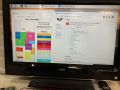
"Mall Map",
Work In Progress -
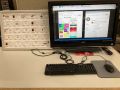
RPi Workstation November 2021 -
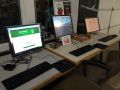
Raspberry Pi computers (Dec 2017) -
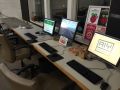
Raspberry Pi computers -
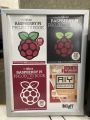
18x24" poster
of RPi Books -
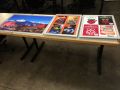
posters, including Raspberry Pi


.png)
.png)
See Also
Arduino Computers
Ubuntu Computers
Other Fun Stuff
50 Raspberry Pi Hacks & Tips You Should Know
Jeff Geerling
- (and Red Shirt Jeff: Destroyer of Pis)
MagPi
- (the Raspberry Pi magazine)
Search the PPM Wiki — include Content pages as well as Multimedia.
Contact Us if you cannot find your answer here on our Wiki or if you notice any outdated information.