Raspberry Pi: Difference between revisions
| Line 17: | Line 17: | ||
==External Training == | ==External Training == | ||
:'''[https://pip.raspberrypi.com/ Product Information Portal]''' | :'''[https://pip.raspberrypi.com/ Product Information Portal]''' | ||
:'''[https://www.raspberrypi.com/documentation/computers/raspberry-pi. | :'''[https://www.raspberrypi.com/documentation/computers/raspberry-pi.html Raspberry Pi hardware]''' | ||
:'''[https://www.raspberrypi.com/documentation/ Raspberry Pi]''' — official documentation | :'''[https://www.raspberrypi.com/documentation/ Raspberry Pi]''' — official documentation | ||
:'''[https://www.raspberrypi.com/tutorials/ Raspberry Pi tutorials]''' — "build easily and affordably" | :'''[https://www.raspberrypi.com/tutorials/ Raspberry Pi tutorials]''' — "build easily and affordably" | ||
| Line 28: | Line 29: | ||
:'''https://learn.adafruit.com/groups/learn-raspberry-pi''' — by Simon Monk | :'''https://learn.adafruit.com/groups/learn-raspberry-pi''' — by Simon Monk | ||
:'''https://learn.sparkfun.com/tutorials/raspberry-gpio/gpio-pinout''' | :'''https://learn.sparkfun.com/tutorials/raspberry-gpio/gpio-pinout''' | ||
==Tips== | ==Tips== | ||
Revision as of 14:56, 11 July 2025
Raspberry Pi's are "single-board and modular computers or micro controllers, built on the Arm architecture, often running a Linux operating system."
To help out with Raspberry Pi projects at PPM, post your ideas and comments on our Slack #electronics channel.

All our members can work on their Raspberry Pi projects at PPM without any additional required training (Level 1).
Links to related PPM Wiki pages:
External Training
- Product Information Portal
- Raspberry Pi hardware
- Raspberry Pi — official documentation
- Raspberry Pi tutorials — "build easily and affordably"
- MagPi — The official Raspberry Pi magazine
- https://store.rpipress.cc/ — Raspberry Pi PRESS
- https://magazine.raspberrypi.com/books — free downloads
- https://learn.adafruit.com/groups/learn-raspberry-pi — by Simon Monk
- https://learn.sparkfun.com/tutorials/raspberry-gpio/gpio-pinout
Tips
Shut down the Raspberry Pi properly: (just pulling the plug could cause memory card corruption.)
- ☐ Use the graphical user interface (GUI), or
- ☐ Use the command:
sudo shutdown -h now
- To find out which shell you're using, run the command
echo $SHELLorps $$ - List/check installed fonts
fc-list | grep "DejaVu Sans" - If the Pi 3 B+ seems slow or unresponsive, check the green light at the edge of the board for activity
50 Raspberry Pi Hacks & Tips You Should Know
Five Ways To Run a Program On Your Raspberry Pi At Startup
Rotate the Raspberry Pi screen
Cheat Sheets
Links to external sites:
Raspberry Pi Commands Cheat Sheet
- on makeuseof.com
Raspberry Pi cheat sheet
- on techrepublic.com
Application Software
Links to external sites:
- Raspberry Pi Imager — install Raspberry Pi OS and other operating systems
- Mathematica — free license on every Raspberry Pi
- Geany — powerful, stable and lightweight programmer's text editor
- Scratch — the world’s largest coding community for children
- Processing — language for learning and prototyping
- Sonic Pi — code-based music creation and performance tool
- tmux — allows multiple terminal sessions simultaneously
- LibreOffice — "private, free and open source office suite"
- ImageMagick — create, edit, compose, or convert digital images
- Fritzing — open source software to document, share, layout, and manufacture professional PCBs
Member Showcase
-
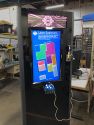 Mall Map (kiosk),
"finished"
(09/03/22) -
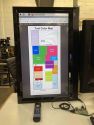 Mall Map,
Work In Progress
(06/08/22) -
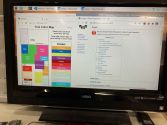 Mall Map,
Work In Progress -
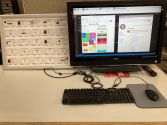 Raspberry Pi Workstation
(November 2021) -
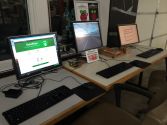 Raspberry Pi computers
(December 2017) -
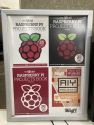 18x24 poster of MagPi Books


Hand-Curated Links
Links to YouTube:
- How Raspberry Pis are made — Jeff Geerling (14:16 mins)
- 10 years of Raspberry Pi — by Eben Upton, CEO (6:47 mins)
- Sam Aaron live coding — Sonic Pi demos
Links to other external sites:
- RetroPie — Retro-gaming on the Raspberry Pi
- Multiple Raspberry PI 3D Scanner — on AUTODESK Instructables
- SparkFun Electronics — source of Raspberry Pi's and electronic components
Additional Help
Links to related PPM Wiki pages:
- Sonic Pi Tips — code-based music creation and live performance tool
- Pi-hole Tips — network-wide ad blocking application
Use the PPM Slack channels #electronics or #general
Note that we have a Slack channel (#job-board) for members to post, discuss, or accept job opportunities either within PPM or from the community.
Search the PPM Wiki — include Content pages as well as Multimedia.
Contact Us if you cannot find your answer here on our Wiki or if you notice any outdated information.