Laser — BOSS: Difference between revisions
No edit summary |
|||
| (345 intermediate revisions by the same user not shown) | |||
| Line 1: | Line 1: | ||
At Pikes Peak Makerspace (PPM), '''our two laser engraver/cutters are the most popular tools in the front part of the building.''' | |||
Our BOSS (LS-3655) laser requires a reservation to use. | |||
<br> | |||
[[File:Level 3 badge.png|alt=Level 3 badge used at Pikes Peak Makerspace|left|frameless|90x90px|PPM TRAINING & CERTIFICATION REQUIRED]] | |||
Our Laser Engraver/Cutter Area at Pikes Peak Makerspace consists mostly of Level 3 equipment. | |||
Additional PPM training and then PPM certification is required to use any of our Level 3 equipment. | |||
<br> | <br> | ||
<br> | <br> | ||
<br> | |||
{{Template:Contact Us}} | |||
<hr style="height:2.5px; background:#D81F2B;"> | |||
<br> | |||
{{Template:Safety}} | {{Template:Safety}} | ||
<br> | |||
<hr style="height:2.5px; background:#D81F2B;"> | |||
== Classes== | |||
: The Boss Laser Safety and Certification class is offered twice per month. | |||
:{{Template:Classes}} | |||
==PPM Training == | |||
:Our BOSSLASER cannot be turned on without scanning the RFID card of a member certified in our T.E.S.L.A. Access system. | |||
==Tips== | |||
:☐ '''"kerf"''' refers to the width of a cut (width of material that is removed). | |||
:☐ The term kerf is also used in woodworking and metalworking (and has the same meaning). | |||
==General Use== | |||
:☐ '''Do not accidentally change the brass knobs on the top of the laser as they control the mirror alignment.''' | |||
:☐ Weights are no longer allowed to hold down material. | |||
:☐ Use pins to hold down your material. | |||
:☐ If not enough pins are available, use Slack to message the Area Contact, or discuss on the #laser-cutter channel. | |||
==Cleaning Policies== | |||
'''''Clean up after use:''''' | |||
:☐ '''Wipe down''' / dust the inside and outside of lid. Glass cleaner may be used if necessary. | |||
:☐ '''Clean''' out the debris in, on, and around the honeycomb. Vacuum if necessary. | |||
:''' | |||
:☐ '''Dump''' out catch tray. | |||
:☐ '''Empty''' small blue trash can if full. | |||
:☐ '''Organize''' computer area. | |||
:☐ '''Sweep''' floor around the boss area. | |||
: | |||
'''''Always leave the space better than when you found it.''''' | |||
== Boss-specific Safety Information == | ==Boss-specific Safety Information== | ||
'''DO NOT cut materials with PVC on any of our lasers,''' this will release chlorine gas which is toxic. | |||
:☐ NEVER cut PVC (When in doubt, error on the side of caution) | |||
:☐ Avoid reflective material (avoid cutting or engraving compact discs, for example) | |||
:☐ Use only approved materials | |||
:☐ NEVER leave the laser unattended while it is running (Stay in the building) | |||
:☐ Leave lid closed for a few moments after your job is completed to allow for proper ventilation | |||
:☐ Up to 80% power is allowed | |||
:☐ Ensure the work area interior and exterior is clean before and after your work | |||
:☐ Keep the exhaust fan and chiller running while the laser is in use | |||
:☐ Make sure Zing Laser isn’t running before turning off fan | |||
==Troubleshooting and Common Issues== | |||
:☐ You should not start your job until you gain confidence about your settings by doing multiple tests. | |||
:☐ It is a good practice to leave the material and laser head in position for inspection. You can, at that point, attempt another pass through if nothing has been moved. | |||
'''Auto-focus malfunction? (The bed is not moving during auto-focus, or the bed is moving down during auto focus)''' | |||
:☐ The laser head may be sticking. GENTLY press up and down with the palm of your hand until back in place. | |||
:☐ If that did not fix the problem, please post a message on the PPM Slack channel #laser-cutter. | |||
'''The laser head is moving and blowing air but the laser is not firing?''' | |||
:☐ Make sure the boss chiller has been turned on. | |||
: | |||
== Equipment Lists == | '''Taking too long?''' | ||
:☐ Check settings for “flood fill” or “fill shapes individually”. Use the preview feature to know if that will help. | |||
==Equipment Lists== | |||
===BOSSLASER=== | ===BOSSLASER=== | ||
{| class="wikitable | {| class="wikitable" | ||
|- style="font-weight:bold; text-align: | |- style="font-weight:bold; text-align:left; font-family:Arial, Helvetica, sans-serif !important; background-color:#D81F2B; color:#ffffff;" | ||
| style="vertical-align:middle;" | | | style="vertical-align:middle;" |Picture | ||
| | |Item | ||
| | |Manufacturer / <br>Model | ||
|- | |- | ||
|[[File:BOSS LASER.jpg|alt=BOSS LASER engraver|center|frameless|150x150px]] | |[[File:BOSS LASER.jpg|alt=BOSS LASER engraver|center|frameless|150x150px]] | ||
|'''Boss 150 Watt''' | |'''Boss 150 Watt''' | ||
'''CO<sub>2</sub> Laser''' | '''CO<sub>2</sub> Laser''' | ||
[[File:Level 3 badge.png|alt=Level 3 badge|left|frameless| | |||
| | '''Cutter/Engraver''' | ||
[[File:Level 3 badge.png|alt=Level 3 badge|left|frameless|45x45px]] | |||
| | |BOSS / | ||
|[ | LS-3655 | ||
| | |- | ||
| | |[[File:Industrial Chiller.jpg|alt=Industrial Chiller|center|frameless|150x150px]] | ||
|'''Industrial Water Chiller''' | |||
|S&A / | |||
CW‑5000DG | |||
|- | |- | ||
| | | | ||
| | | | ||
| | | | ||
|- | |- | ||
|[[File:Compressor.jpg|alt=Compressor|center|frameless|150x150px]] | |[[File:Compressor.jpg|alt=Compressor|center|frameless|150x150px]] | ||
|'''Compressor''' | |'''Compressor''' | ||
| | | | ||
|- | |- | ||
|[[File:BOSS LASER | |[[File:BOSS LASER OUTFEED TABLE.jpg|alt=BOSS LASER OUTFEED TABLE|center|frameless|150x150px]] | ||
|''' | |'''OUTFEED TABLE''' | ||
| | | | ||
|- | |- style="font-weight:bold; text-align:left; font-family:Arial, Helvetica, sans-serif !important; color:#000000;" | ||
| style="vertical-align:middle;" | | |||
| | | | ||
| | | | ||
|} | |} | ||
=== | ===Equipment Reservations=== | ||
:* Reserve 24 Hours in Advance to Guarantee Equipment. | |||
:* Reservations are given up after 15 minute no show. | |||
:'''If you don't have a reservation:''' | |||
:* Be sure your job does not run longer than an upcoming reservation or you are expected to stop your job. | |||
==PPM Benefits== | |||
{{Member Benefits}} | |||
:'''At home LightBurn subscriptions can be purchased at a discounted rate for being a PPM member.''' | |||
:The discount code is saved as a Pinned Message in our 'laser-cutter' channel in Slack. | |||
== PPM Policies == | |||
'''Materials''' | |||
:'''DO NOT cut materials with PVC on any of our lasers,''' this will release chlorine gas which is toxic. | |||
:'''Avoid reflective material.''' (Avoid cutting or engraving compact discs, for example.) | |||
:To donate'' for "Wood Sheet for Laser" use the Optix app.'' | |||
:[[Laser Cutting Material Table|'''Laser Cutting Material Table''']] | |||
:''' | :[[Laser Cutting Acrylic|'''Laser Cutting Acrylic''']] | ||
:''' | |||
:''' | {{Red Tags}} | ||
==LightBurn Subscriptions== | |||
At home LightBurn subscriptions can be purchased at a discounted rate for being a PPM member. | |||
The discount code is saved as a Pinned Message in our 'laser-cutter' channel in Slack. | |||
'''''Please note:''''' | |||
:Your at home subscription is unique to only you. | |||
:You will receive an email from LightBurn with your unique registration key. | |||
:Make note of that key because you will need it again if you renew your subscription. | |||
: | |||
:PPM does not have access to your registration key.<br> | |||
: | |||
== | == Related Software == | ||
The dedicated computer in our BOSS cutter/engraver area has the following design and printing software installed, and more: | |||
=== | ==='''Design Software'''=== | ||
:'''[[LightBurn Tips]]''' | |||
:'''[[Adobe Creative Cloud Tips#Adobe Illustrator Tips|Adobe Illustrator Tips]]''' | |||
:'''[[Adobe Creative Cloud Tips#Adobe Photoshop Tips|Adobe Photoshop Tips]]''' | |||
==='''Printing Software'''=== | |||
:'''[https://lightburnsoftware.com/ LightBurn Software]''' — home page | |||
== | ==Additional Help== | ||
: Use the PPM Slack channel #laser-cutter | |||
:Note that we have a Slack channel (#job-board) for members to post, discuss, or accept job opportunities either within PPM or from the community. | |||
{{Template:Footer}} | {{Template:Footer}} | ||
<hr style="height:2.5px; background:#D81F2B;"> | |||
Latest revision as of 05:21, 23 July 2026
At Pikes Peak Makerspace (PPM), our two laser engraver/cutters are the most popular tools in the front part of the building.
Our BOSS (LS-3655) laser requires a reservation to use.

Our Laser Engraver/Cutter Area at Pikes Peak Makerspace consists mostly of Level 3 equipment.
Additional PPM training and then PPM certification is required to use any of our Level 3 equipment.
Contact Us if you cannot find your answer here on our Wiki or if you notice any outdated information.
Safety First
Members must know the following information:
- In case of emergency, call 911.
- Our physical location is:
- 735 East Pikes Peak Avenue
- Colorado Springs, CO 80903
-
 IN CASE OF
EMERGENCY
sign

PPM Fire Escape Plan
- Fire Escape Plan maps are posted throughout the Makerspace.
- There are 7 fire extinguishers on the fire escape plan map.
- Review the PPM Fire Escape Plan for locations.
-
 PPM Emergency
Evacuation Plan.pdf -
 PPM Fire
Prevention Plan.pdf -
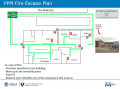 PPM Fire Escape
Plan

First Aid
- There is a FIRST AID Supply Cabinet in our Kitchen Area.
- FIRST AID Kits are available in four areas: the Kitchen, Metal Shop, Wood Shop and CNC Room.
-
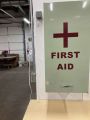 FIRST AID
Supply Cabinet -
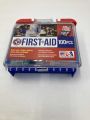 FIRST AID
Kit


Eye Wash Stations
- Emergency Eye & Face Wash Stations are mounted in four areas: the Kitchen, Wood Shop, CNC Room and Vented Room.
-
 Emergency
Eye & Face Wash
Station

Personal Protective Equipment (PPE)
- Wear protective equipment in all Wood and Metal Shop Areas.
- Wear gloves when using Isopropyl Alcohol and other cleaners.
- Gloves should not be worn when using powered equipment (saws, jointers, drills, or other equipment). Leather gloves can be worn for handling materials, but not when operating machinery.
-
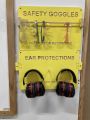 Personal Protective Equipment (PPE)

Hazardous Chemicals
- All hazardous chemicals must be stored in the yellow hazardous chemical storage cabinet located in the Vented Room.
- Review the Safety Data Sheet (SDS) information of unknown products before use.
- SDS information is available via this spreadsheet.
- Do not bring dangerous chemicals to the makerspace.
- Spray paint, stains, and other approved items must be stored in the hazardous chemical storage cabinet in the Vented Room.
- Please DO NOT paint indoors.
-
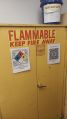 Flammables Cabinet
in the Vented Room

Other Hazards
- Avoid placing uncovered (extension) cords, hoses, cables, or wires across the floors of our shops.
Impairment
- The use of PPM equipment requires you to be alert, attentive, and focused.
- Do not use any PPM work area, or any PPM tools, if you are under the influence of drugs or alcohol.
Classes
- The Boss Laser Safety and Certification class is offered twice per month.
PPM Training
- Our BOSSLASER cannot be turned on without scanning the RFID card of a member certified in our T.E.S.L.A. Access system.
Tips
- ☐ "kerf" refers to the width of a cut (width of material that is removed).
- ☐ The term kerf is also used in woodworking and metalworking (and has the same meaning).
General Use
- ☐ Do not accidentally change the brass knobs on the top of the laser as they control the mirror alignment.
- ☐ Weights are no longer allowed to hold down material.
- ☐ Use pins to hold down your material.
- ☐ If not enough pins are available, use Slack to message the Area Contact, or discuss on the #laser-cutter channel.
Cleaning Policies
Clean up after use:
- ☐ Wipe down / dust the inside and outside of lid. Glass cleaner may be used if necessary.
- ☐ Clean out the debris in, on, and around the honeycomb. Vacuum if necessary.
- ☐ Dump out catch tray.
- ☐ Empty small blue trash can if full.
- ☐ Organize computer area.
- ☐ Sweep floor around the boss area.
Always leave the space better than when you found it.
Boss-specific Safety Information
DO NOT cut materials with PVC on any of our lasers, this will release chlorine gas which is toxic.
- ☐ NEVER cut PVC (When in doubt, error on the side of caution)
- ☐ Avoid reflective material (avoid cutting or engraving compact discs, for example)
- ☐ Use only approved materials
- ☐ NEVER leave the laser unattended while it is running (Stay in the building)
- ☐ Leave lid closed for a few moments after your job is completed to allow for proper ventilation
- ☐ Up to 80% power is allowed
- ☐ Ensure the work area interior and exterior is clean before and after your work
- ☐ Keep the exhaust fan and chiller running while the laser is in use
- ☐ Make sure Zing Laser isn’t running before turning off fan
Troubleshooting and Common Issues
- ☐ You should not start your job until you gain confidence about your settings by doing multiple tests.
- ☐ It is a good practice to leave the material and laser head in position for inspection. You can, at that point, attempt another pass through if nothing has been moved.
Auto-focus malfunction? (The bed is not moving during auto-focus, or the bed is moving down during auto focus)
- ☐ The laser head may be sticking. GENTLY press up and down with the palm of your hand until back in place.
- ☐ If that did not fix the problem, please post a message on the PPM Slack channel #laser-cutter.
The laser head is moving and blowing air but the laser is not firing?
- ☐ Make sure the boss chiller has been turned on.
Taking too long?
- ☐ Check settings for “flood fill” or “fill shapes individually”. Use the preview feature to know if that will help.
Equipment Lists
BOSSLASER
| Picture | Item | Manufacturer / Model |
 |
Boss 150 Watt
CO2 Laser Cutter/Engraver |
BOSS /
LS-3655 |
 |
Industrial Water Chiller | S&A /
CW‑5000DG |
 |
Compressor | |
 |
OUTFEED TABLE | |
Equipment Reservations
- Reserve 24 Hours in Advance to Guarantee Equipment.
- Reservations are given up after 15 minute no show.
- If you don't have a reservation:
- Be sure your job does not run longer than an upcoming reservation or you are expected to stop your job.
PPM Benefits
- PPM members enjoy discounts at the following local merchants:
- (bring proof of PPM membership)
| Website | Benefit | Address |
|---|---|---|
| Woodcraft of Colorado Springs | 10% discount | 4438 Austin Bluffs Parkway |
| CO Lumber Specialties | 10% discount | 3636 Stone Avenue |
| GENERAL AIR | 10% discount | 3031 N Nevada Ave. |
| ACE Hardware Uintah Gardens | 10% discount | 1830 W Uintah Street |
- At home LightBurn subscriptions can be purchased at a discounted rate for being a PPM member.
- The discount code is saved as a Pinned Message in our 'laser-cutter' channel in Slack.
PPM Policies
Materials
- DO NOT cut materials with PVC on any of our lasers, this will release chlorine gas which is toxic.
- Avoid reflective material. (Avoid cutting or engraving compact discs, for example.)
- To donate for "Wood Sheet for Laser" use the Optix app.
Red Tags
- If equipment needs repairs, place a Red Tag on it and report it via the Pikes Peak Makerspace Slack channel #red-tag-issues
- This advises others on the malfunctioning equipment and ensures that actions can be taken to service/repair the equipment.
LightBurn Subscriptions
At home LightBurn subscriptions can be purchased at a discounted rate for being a PPM member.
The discount code is saved as a Pinned Message in our 'laser-cutter' channel in Slack.
Please note:
- Your at home subscription is unique to only you.
- You will receive an email from LightBurn with your unique registration key.
- Make note of that key because you will need it again if you renew your subscription.
- PPM does not have access to your registration key.
Related Software
The dedicated computer in our BOSS cutter/engraver area has the following design and printing software installed, and more:
Design Software
Printing Software
- LightBurn Software — home page
Additional Help
- Use the PPM Slack channel #laser-cutter
- Note that we have a Slack channel (#job-board) for members to post, discuss, or accept job opportunities either within PPM or from the community.
Search the PPM Wiki — include Content pages as well as Multimedia.
Contact Us if you cannot find your answer here on our Wiki or if you notice any outdated information.