Wood Shop — Festool power tools: Difference between revisions
| (22 intermediate revisions by the same user not shown) | |||
| Line 4: | Line 4: | ||
'''Links to related PPM Wiki pages:''' | '''Links to related PPM Wiki pages:''' | ||
:[[Wood Shop — SawStop|<span style="color:#FFFFFF; background:#3DA942"> '''Wood Shop — SawStop''' </span>]] | :[[Wood Shop|<span style="color:#FFFFFF; background:#3DA942"> '''Wood Shop''' </span>]] | ||
:[[Wood Shop — SawStop table saw|<span style="color:#FFFFFF; background:#3DA942"> '''Wood Shop — SawStop table saw''' </span>]] | |||
<br> | <br> | ||
[[File:Level 3 badge.png|alt=Level 3 badge used at Pikes Peak Makerspace|left|frameless|90x90px|PPM TRAINING & CERTIFICATION REQUIRED]] | [[File:Level 3 badge.png|alt=Level 3 badge used at Pikes Peak Makerspace|left|frameless|90x90px|PPM TRAINING & CERTIFICATION REQUIRED]] | ||
Additional PPM training and then PPM certification is required to use any | Additional PPM training and then PPM certification is required to use any Level 3 equipment. | ||
Our trainers are passionate about sharing their knowledge and ensuring a positive learning experience for all. | Our trainers are passionate about sharing their knowledge and ensuring a positive learning experience for all. | ||
| Line 20: | Line 21: | ||
{{Template:Contact Us}} | {{Template:Contact Us}} | ||
< | <hr style="height:2.5px; background:#3DA942;"> | ||
<br> | <br> | ||
==Festool Orientation== | ==Festool Orientation== | ||
| Line 27: | Line 28: | ||
'''''Contact the Owner of the tools directly on Slack.''''' | '''''Contact the Owner of the tools directly on Slack.''''' | ||
== | == Festool External Training == | ||
==Festool Equipment List — Level 3 Tools== | ==='''[https://www.festoolusa.com/service/owners-manuals FESTOOL Owner's Manuals]'''=== | ||
===[https://www.festoolownersgroup.com/ Festool Owners Group]=== | |||
== Festool Equipment List — Level 3 Tools == | |||
{| class="wikitable" | {| class="wikitable" | ||
|- style="font-weight:bold; text-align:left; font-family:Arial, Helvetica, sans-serif !important; background-color:#3DA942; color:#ffffff;" | |- style="font-weight:bold; text-align:left; font-family:Arial, Helvetica, sans-serif !important; background-color:#3DA942; color:#ffffff;" | ||
| style="vertical-align:middle;" |Picture | | style="vertical-align:middle;" |Picture | ||
|Item | |Item | ||
|Model <br>Number | |||
|Model | |||
Number | |||
|Owner | |Owner | ||
|- | |- | ||
| Line 42: | Line 45: | ||
|'''Track Saw'''<br> | |'''Track Saw'''<br> | ||
[[File:Level 3 badge.png|alt=Level 3 badge|left|frameless|45x45px]] | [[File:Level 3 badge.png|alt=Level 3 badge|left|frameless|45x45px]] | ||
|FESTOOL | |FESTOOL | ||
TS 55 EQ | TS 55 EQ | ||
| Line 50: | Line 52: | ||
|'''Sander (Half Sheet)'''<br> | |'''Sander (Half Sheet)'''<br> | ||
[[File:Level 3 badge.png|alt=Level 3 badge|left|frameless|45x45px]] | [[File:Level 3 badge.png|alt=Level 3 badge|left|frameless|45x45px]] | ||
|FESTOOL | |FESTOOL | ||
RS 2-E-Plus | RS 2-E-Plus | ||
| Line 58: | Line 59: | ||
|'''Sander (Orbital)'''<br> | |'''Sander (Orbital)'''<br> | ||
[[File:Level 3 badge.png|alt=Level 3 badge|left|frameless|45x45px]] | [[File:Level 3 badge.png|alt=Level 3 badge|left|frameless|45x45px]] | ||
|FESTOOL | |FESTOOL | ||
ETS 150/5 EQ-Plus | ETS 150/5 EQ-Plus | ||
| Line 66: | Line 66: | ||
|'''Dust Collector'''<br> | |'''Dust Collector'''<br> | ||
[[File:Level 3 badge.png|alt=Level 3 badge|left|frameless|45x45px]] | [[File:Level 3 badge.png|alt=Level 3 badge|left|frameless|45x45px]] | ||
|FESTOOL | |FESTOOL | ||
CLEANTEC CT 22 E | CLEANTEC CT 22 E | ||
| Line 74: | Line 73: | ||
|'''Multifunction Table'''<br> | |'''Multifunction Table'''<br> | ||
[[File:Level 3 badge.png|alt=Level 3 badge|left|frameless|45x45px]] | [[File:Level 3 badge.png|alt=Level 3 badge|left|frameless|45x45px]] | ||
|FESTOOL | |FESTOOL | ||
1080 | 1080 | ||
| Line 80: | Line 78: | ||
|- style="font-weight:bold; text-align:left; font-family:Arial, Helvetica, sans-serif !important; color:#000000;" | |- style="font-weight:bold; text-align:left; font-family:Arial, Helvetica, sans-serif !important; color:#000000;" | ||
| style="vertical-align:middle;" | | | style="vertical-align:middle;" | | ||
| | | | ||
| | | | ||
| Line 95: | Line 92: | ||
==Policies== | ==Policies== | ||
'''Materials''' | :'''Materials''' | ||
: | ::To donate for "Sheet Goods" use the Optix app. | ||
: | :[[New Member Orientation#Red Tags|'''Red Tags''']] — designate broken equipment | ||
''' | |||
==Additional Help== | ==Additional Help== | ||
:Use the PPM Slack channel #wood-shop | :Use the PPM Slack channel #wood-shop | ||
:Note that we have a Slack channel (#job-board) for members to post, discuss, or accept job opportunities either within PPM or from the community. | :Note that we have a Slack channel (#job-board) for members to post, discuss, or accept job opportunities either within PPM or from the community. | ||
{{Template:Footer}} | {{Template:Footer}} | ||
< | <hr style="height:2.5px; background:#3DA942;"> | ||
Latest revision as of 19:37, 29 May 2026
The Festool power tools in the Wood Shop Area are on loan to Pikes Peak Makerspace (PPM) and are Level 3 tools.
Links to related PPM Wiki pages:

Additional PPM training and then PPM certification is required to use any Level 3 equipment.
Our trainers are passionate about sharing their knowledge and ensuring a positive learning experience for all.
We are grateful for their commitment and dedication to our community.
Contact Us if you cannot find your answer here on our Wiki or if you notice any outdated information.
Festool Orientation
How to Become PPM-Certified to use the Festool equipment
Contact the Owner of the tools directly on Slack.
Festool External Training
FESTOOL Owner's Manuals
Festool Owners Group
Festool Equipment List — Level 3 Tools
| Picture | Item | Model Number |
Owner |
 |
Track Saw |
FESTOOL
TS 55 EQ |
John Norton |
 |
Sander (Half Sheet) |
FESTOOL
RS 2-E-Plus |
John Norton |
 |
Sander (Orbital) |
FESTOOL
ETS 150/5 EQ-Plus |
John Norton |
 |
Dust Collector |
FESTOOL
CLEANTEC CT 22 E |
John Norton |
| Multifunction Table |
FESTOOL
1080 |
John Norton | |
-
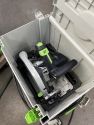 FESTOOL Track Saw,
in Systainer -
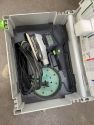 FESTOOL Orbital Sander,
in Systainer -
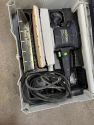 FESTOOL Half Sheet Sander,
in Systainer


Benefits
- PPM members enjoy discounts at the following local merchants:
- (bring proof of PPM membership)
| Website | Benefit | Address |
|---|---|---|
| Woodcraft of Colorado Springs | 10% discount | 4438 Austin Bluffs Parkway |
| CO Lumber Specialties | 10% discount | 3636 Stone Avenue |
| GENERAL AIR | 10% discount | 3031 N Nevada Ave. |
| ACE Hardware Uintah Gardens | 10% discount | 1830 W Uintah Street |
Policies
- Materials
- To donate for "Sheet Goods" use the Optix app.
- Red Tags — designate broken equipment
Additional Help
- Use the PPM Slack channel #wood-shop
- Note that we have a Slack channel (#job-board) for members to post, discuss, or accept job opportunities either within PPM or from the community.
Search the PPM Wiki — include Content pages as well as Multimedia.
Contact Us if you cannot find your answer here on our Wiki or if you notice any outdated information.