(113 intermediate revisions by the same user not shown) Line 1:
Line 1: '''Learn about the Shared Tools in every area at Pikes Peak Makerspace (PPM).'''
'''Learn about our shared tools at Pikes Peak Makerspace (PPM).'''
<br>
<br>
<br>
<br>
{{Template:Contact Us}}
<hr style="height :2.5px; background:#ff6c00;">
<br>
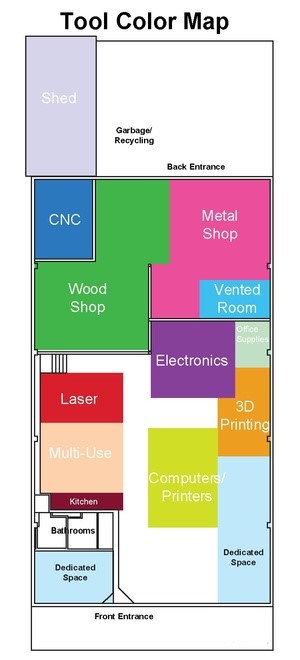
:[[File:Tool_Color_Map.jpg|alt=Tool Color Map|660x660px|right|frameless|Map]]
==='''Back of shop (South part of building)'''===
:[[Wood Shop|<span style="color:#FFFFFF; background:#3DA942"> '''Wood Shop''' </span>]]
:[[Wood Shop — SawStop table saw|<span style="color:#FFFFFF; background:#3DA942"> '''Wood Shop — SawStop table saw''' </span>]]
:[[Wood Shop — Festool power tools|<span style="color:#FFFFFF; background:#3DA942"> '''Wood Shop — Festool power tools''' </span>]]
:[[CNC|<span style="color:#FFFFFF; background:#2B78BE"> '''CNC Router Table''' </span>]]
:[[Metal Shop|<span style="color:#FFFFFF; background:#EB4F9C"> '''Metal Shop''' </span>]]
:[[Welding Area|<span style="color:#FFFFFF; background:#EB4F9C"> '''Metal Shop — Welding Area''' </span>]]
:'''[[Vented Room]]'''
:'''[[Shed]]'''
<p style="padding:0.2em 0.4em; background:#ff6c00; color:#FFFFFF; font-size:15%;"> </p>
==='''Front of shop (North part of building)'''===
:[[File:Tool_Color_Map.jpg|alt=Tool Color Map|660x660px|thumb|[https://wiki.pikespeakmakerspace.org/images/0/09/Tool_Color_Map_with_links.pdf '''Interactive Version''']]]
:[[Laser — BOSS |<span style ="color:#FFFFFF; background :#D81F2B"> '''Laser — BOSS ''' </span> ]]
==='''Shop (Back / South) part of building'''===
:[[Laser — Epilog Zing |<span style="color:#FFFFFF; background:#D81F2B "> '''Laser — Epilog Zing ''' </span>]]
'''''Choose a colored link from the following list:'''''
:[[Wood_Shop|<span style="color:#FFFFFF; background:#42B649"> '''Wood Shop''' </span>]]
:[[Wood_Shop_--_SawStop|<span style="color:#FFFFFF; background:#42B649"> '''Wood Shop — SawStop''' </span>]]
:[[CNC|<span style="color:#FFFFFF; background:#2B78BE"> '''CNC Router Table''' </span>]] - '''[https://pikespeakmakerspace.org/reserve make a reservation]'''
:[[Metal_Shop|<span style="color:#FFFFFF; background:#EB4F9C"> '''Metal Shop''' </span>]]
:[[Metal_Shop — CNC SHOPMASTER|<span style="color:#FFFFFF; background:#EB4F9C"> '''Metal Shop — CNC SHOPMASTER''' </span>]]
:[[Sandblasting Cabinet|<span style="color:#FFFFFF; background:#EB4F9C"> '''Metal Shop — Sandblasting Cabinet''' </span>]]
:[[Powder_Coating_Area|<span style="color:#FFFFFF; background:#EB4F9C"> '''Metal Shop — Powder Coating''' </span>]]
:[[Welding_Area|<span style="color:#FFFFFF; background:#EB4F9C"> '''Metal Shop — Welding Area''' </span>]]
:[[Vented_Room|<span style="color:#FFFFFF; background:#3EC0F0"> '''Vented Room''' </span>]] - '''[https://pikespeakmakerspace.org/reserve make a reservation]'''
:[[Shed|<span style="color:#FFFFFF; background:#D7D4EB"> '''Shed''' </span>]]
:Our Wood Shop is our most popular area, overall.
==='''Clean (Front / North) part of building'''===
:[[3D Printing — Filament (FDM) |<span style="color:#FFFFFF ; background:#EE9F21"> '''3D Printing — Filament (FDM)''' </span>]]
'''''Choose a colored link from the following list:'''''
:[[3D Printing — Resin (SLA) |<span style="color:#FFFFFF ; background:#EE9F21"> '''3D Printing — Resin (SLA)''' </span>]]
:[[3D Printing|<span style="color:#000000; background:#EE9F21"> '''3D Printing — Filament (FDM)''' </span>]]
:[[3D Printing -- Resin|<span style="color:#000000; background:#EE9F21"> '''3D Printing — Resin (SLA)''' </span>]]
:'''[[Electronics ]]'''
:[[3D Scanning|<span style="color:#000000; background:#EE9F21"> '''3D Scanning''' </span>]]
:[[Computers|<span style="color:#000000; background:#D0DD27"> '''Computers — Windows''' </span>]]
:'''[[Classroom and Meeting Area ]]'''
:[[Computers -- Mac and Apple|<span style="color:#000000; background:#D0DD27"> '''Computers — Mac and Apple''' </span>]]
:[[Printers|<span style="color:#000000; background:#D0DD27"> '''Printers''' </span>]]
:'''[[Computers — Windows ]]'''
:[[Large_Format_Printing|<span style="color:#000000; background:#D0DD27"> '''Printers — Large Format''' </span>]]
:'''[[Dye Sublimation Printing |Printers — Dye Sublimation ]]'''
:[[Dye_Sublimation_Printing|<span style="color:#000000; background:#D0DD27"> '''Printers — Dye Sublimation''' </span>]]
:[[Vinyl_Cutting|<span style="color:#000000; background:#D0DD27"> '''Vinyl Cutting''' </span>]]
:'''[[Vinyl Cutting ]]'''
:[[Electronics|<span style="color:#FFFFFF; background:#864199"> '''Electronics''' </span>]]
:[[PPM_Library|<span style="color:#FFFFFF; background:#864199"> '''PPM Library''' </span>]]
== PPM Equipment Levels = =
:[[Laser_--_BOSS|<span style="color:#FFFFFF; background:#D81F2B"> '''Laser — BOSS''' </span>]] - '''[https://pikespeakmakerspace.org/reserve make a reservation]'''
:[[Laser|<span style="color:#FFFFFF; background:#D81F2B"> '''Laser — Epilog Zing''' </span>]] - '''[https://pikespeakmakerspace.org/reserve make a reservation]'''
'''''Shared equipment at our makerspace is categorized into three levels (1 -3), '''''
:[[Kitchen|<span style="color:#FFFFFF; background:#81132F"> '''Kitchen''' </span>]]
:[[Multi-Use|<span style="color:#000000; background:#FDD1AC"> '''Multi-Use''' </span>]]
'''''by amount of PPM training required :'''''
:[[Classroom_and_Meeting_Area|<span style="color:#000000; background:#FDD1AC"> '''Classroom / Meeting Area''' </span>]] - '''[https://pikespeakmakerspace.org/reserve make a reservation]'''
:[[Dedicated_Space|<span style="color:#000000; background:#C0E7FA"> '''Dedicated Space''' </span>]]
*'''[https://wiki.pikespeakmakerspace.org/index.php/File:Level_1_badge.png Level 1] - '' No training''''' '' '''required'''.'' <br>PPM shared equipment that is immediately available to use by all paid PPM Members.
:Our lasers are the most popular tools in the front part of the building.
'''''<br />Equipment at PPM is categorized into the following three levels:'''''
*'''[https://wiki.pikespeakmakerspace.org/index.php/File:Level_2_badge.png Level 2] - '' Training required'' '''<nowiki />''.'' <br>Equipment *buy-in* (usually just one PPM class, with a small additional fee).
*'''[https://wiki.pikespeakmakerspace.org/index.php/File:Level_1_badge.png Level 1] - No training''' required, immediately available to all paid PPM Members
*'''[https://wiki.pikespeakmakerspace.org/index.php/File:Level_2_badge.png Level 2] - Training''' and/or equipment *buy-in* required
*'''[https://wiki.pikespeakmakerspace.org/index.php/File:Level_3_badge.png Level 3] - ''PPM certification required.'' ''' <br>Under supervision of a PPM Captain, or by taking a PPM certification course.
*'''[https://wiki.pikespeakmakerspace.org/index.php/File:Level_3_badge.png Level 3] - Required to be certified''' under supervision of a PPM Captain, or by taking a certification course listed on Meetup<br>
<br>
== Additional Help==
<br>
==For Additional Help==
{{Template:Footer}}
{{Template:Footer}}
{{Template:Ideas into reality}}
<hr style="height :2 .5px ; background:#ff6c00;">
<p style="padding:0.2em 0.4em; background:#ff6c00; color:#FFFFFF; font-size:15%;"> </p>
<!--Woodshop-->
Learn about our shared tools at Pikes Peak Makerspace (PPM).
Map Back of shop (South part of building) Wood Shop Wood Shop — SawStop table saw Wood Shop — Festool power tools CNC Router Table Metal Shop Metal Shop — Welding Area Vented Room Shed Front of shop (North part of building) Laser — BOSS Laser — Epilog Zing 3D Printing — Filament (FDM) 3D Printing — Resin (SLA) Electronics Classroom and Meeting Area Computers — Windows Printers — Dye Sublimation Vinyl Cutting PPM Equipment Levels Shared equipment at our makerspace is categorized into three levels (1-3),
by amount of PPM training required:
Level 1 - No training required .Level 2 - Training required . Level 3 - PPM certification required. Additional Help Search the PPM Wiki
Contact Us