3D Printing — Filament (FDM): Difference between revisions
mNo edit summary |
No edit summary |
||
| (765 intermediate revisions by the same user not shown) | |||
| Line 1: | Line 1: | ||
'''Pikes Peak Makerspace (PPM) provides the 3D printers and supplies listed below to its members.''' | |||
= | No reservations are required for any of our 3D Printers at this time, they are "first‑come, first‑served".<br> | ||
The 3D Printing Area consists mostly of Level 2 equipment. | <br> | ||
[[File:Level 2 badge.png|alt=Level 2 badge used at Pikes Peak Makerspace|left|frameless|90x90px|PPM TRAINING REQUIRED]] | |||
The 3D Printing Area at Pikes Peak Makerspace (PPM) consists mostly of Level 2 equipment. | |||
Additional PPM training is required to use any of our Level 2 equipment. | |||
Our trainers are passionate about sharing their knowledge and ensuring a positive learning experience for all. | |||
We are grateful for their commitment and dedication to our community. | |||
<br> | |||
{{Template:Contact Us}}<hr style="height:2.5px; background:#EE9F21;"> | |||
= | <br> | ||
{{Template:Safety}} | |||
<br> | |||
<br> | |||
<hr style="height:2.5px; background:#EE9F21;"> | |||
== | ==Classes== | ||
:'''[https://docs.google.com/document/d/19Kd1ZjBzIkBxqTE1KEoXh08TGZZaiooPNXcRInKPV5E/edit?usp=drivesdk Intro To 3D Printing] — class information from Josh Rafail''' | |||
:{{Template:Classes}} | |||
:To help out in the 3D Printing Area at PPM, use our #3d-printing channel on Slack. | |||
https:// | ==External Training== | ||
:[https://teachingtechyt.github.io/calibration.html '''Teaching Tech 3D Printer Calibration'''] | |||
:: ''a great resource to calibrate and fine tune your 3d printer'' | |||
:'''[https://help.prusa3d.com/ PRUSA KNOWLEDGE BASE]''' | |||
:'''[https://help.prusa3d.com/materials Prusa Material Table]''' | |||
:'''[https://www.simplify3d.com/support/materials-guide/#all Ultimate 3D Printing Materials Guide]''' — SIMPLYFY3D | |||
''' | :'''[https://www.3dsourced.com/rigid-ink/ultimate-3d-printing-troubleshooting-guide/ 44 Common 3D Print Problems]''' — on 3dsourced.com | ||
:'''[https://reprap.org/wiki/Glossary RepRap Glossary]''' — common terms and abbreviations | |||
== | == Equipment Lists == | ||
'''(Pikes Peak Makerspace no longer has any LulzBot TAZ printers.)''' | |||
=== '''3D Printers — Level 2''' === | |||
{| class="wikitable" | |||
|- style="font-weight:bold; text-align:left; font-family:Arial, Helvetica, sans-serif !important; background-color:#ee9f21; color:#FFFFFF;" | |||
|Picture | |||
|Item | |||
|Build Volume | |||
|Upgrades | |||
|Resources | |||
|- | |||
| | |||
|'''3D Printer''' | |||
'''Bambu Lab A1''' | |||
'''"Rick"''' | |||
[[File:Level_2_badge.png|alt=Level 2 badge|left|frameless|45x45px]] | |||
| | |||
|AMS Lite | |||
multi filament | |||
addition | |||
|[https://bambulab.com/en-us/a1 website] | |||
|- | |||
| | |||
|'''3D Printer''' | |||
'''Bambu Lab A1''' | |||
'''"Morty"''' | |||
= | [[File:Level_2_badge.png|alt=Level 2 badge|left|frameless|45x45px]] | ||
''' | | | ||
|AMS Lite | |||
multi filament | |||
addition | |||
|[https://bambulab.com/en-us/a1 website] | |||
|- | |||
| | |||
| | |||
| | |||
| | |||
| | |||
|- | |||
| | |||
|'''3D Printer''' | |||
'''Prusa MK3S''' | |||
= | [[File:Level_2_badge.png|alt=Level 2 badge|left|frameless|45x45px]] | ||
|250x210x200 mm | |||
| E3D Revo Hotend<br> | |||
2 Fan Upgrade<br> | |||
Quick fit nozzle<br> | |||
Obsidian nozzle<br> | |||
Bed w/ PEI coating | |||
|[https://e3d-online.com/collections/prusa-upgrades Prusa Upgrades - E3D] | |||
|- | |||
| | |||
|'''3D Printer''' | |||
'''Prusa MK3S''' | |||
=== | [[File:Level_2_badge.png|alt=Level 2 badge|left|frameless|45x45px]] | ||
https:// | |250x210x200 mm | ||
| E3D Revo Hotend<br> | |||
2 fan upgrade<br> | |||
Quick fit nozzle<br> | |||
Brass nozzle<br> | |||
Bed w/ PEI coating | |||
|[https://e3d-online.com/collections/prusa-upgrades Prusa Upgrades - E3D] | |||
|- style="font-weight:bold; text-align:left; font-family:Arial, Helvetica, sans-serif !important; color:#FFFFFF;" | |||
| | |||
| | |||
| | |||
| | |||
| | |||
|} | |||
===3D Printing Equipment — Level 1=== | |||
{| class="wikitable" | |||
|- style="font-weight:bold; text-align:left; font-family:Arial, Helvetica, sans-serif !important;; background-color:#ee9f21; color:#FFFFFF;" | |||
| style="vertical-align:middle;" |Picture | |||
|Item | |||
|Manufacturer /<br>Model | |||
|- | |||
|[[File:Dryer oven.jpg|alt=Dryer oven|200x200px|center|frameless]] | |||
|'''lab oven / dryer''' | |||
'''with timer''' | |||
(12"x12"x12" interior) | |||
|Curtin Matheson | |||
|- | |||
|[[File:Filament dryer box.jpg|alt=filament dryer box|200x200px|center|frameless]] | |||
|'''filament dryer box''' | |||
|PPM | |||
|- | |||
|[[File:Fume Extractor.jpg|alt=Fume Extractor|200x200px|center|frameless]] | |||
|'''Fume Extractor''' | |||
|PACE | |||
<nowiki> 8888-0825</nowiki> | |||
|- | |||
|[[File:IMPULSE SEALER new.jpg|alt=IMPULSE SEALER new|center|frameless|120x120px|link=https://wiki.pikespeakmakerspace.org/index.php/File:IMPULSE_SEALER_new.jpg]] | |||
|'''IMPULSE HEAT SEALER''' | |||
'''12" w cutter''' | |||
|Midwest Pacific, | |||
MP-12C | |||
|- | |||
| | |||
| | |||
| | |||
|- | |||
|[[File:3Doodler create.jpg|alt=3Doodler create|133x133px|center|frameless]] | |||
|'''3Doodler create''' | |||
|3Doodler | |||
STAR TREK | |||
|- style="font-weight:bold; text-align:left; font-family:Arial, Helvetica, sans-serif !important; color:#FFFFFF;" | |||
| style="vertical-align:middle;" | | |||
| | |||
| | |||
|} | |||
<gallery widths="200" heights="125"> | |||
File:IMPULSE SEALER LABEL.jpg|alt=IMPULSE HEAT SEALER label|'''IMPULSE HEAT SEALER<br>label''' | |||
</gallery> | |||
=== Hand Tools === | |||
:☐ Return all tools to their proper location after use. This rule applies to all areas of our Makerspace. | |||
== Policies == | |||
{{Red Tags}} | |||
==Software== | |||
=== Slicing Software === | |||
:'''[https://help.prusa3d.com/en/category/prusaslicer_204 PrusaSlicer]''' — prepare (slice) 3D models for 3D printing | |||
== Additional Help == | |||
'''Links to related PPM Wiki pages:''' | |||
:[[3D Printing — Resin (SLA)|<span style="color:#FFFFFF; background:#EE9F21"> '''3D Printing — Resin (SLA)''' </span>]] | |||
<br>Use our PPM Slack channel #3d-printing for FDM or SLA printing questions. | |||
Note that we have a Slack channel (#job-board) for members to post, discuss, or accept job opportunities either within PPM or from the community. | |||
{{Template:Footer}} | |||
<hr style="height:2.5px; background:#EE9F21;"> | |||
Latest revision as of 10:44, 7 October 2026
Pikes Peak Makerspace (PPM) provides the 3D printers and supplies listed below to its members.
No reservations are required for any of our 3D Printers at this time, they are "first‑come, first‑served".

The 3D Printing Area at Pikes Peak Makerspace (PPM) consists mostly of Level 2 equipment.
Additional PPM training is required to use any of our Level 2 equipment.
Our trainers are passionate about sharing their knowledge and ensuring a positive learning experience for all.
We are grateful for their commitment and dedication to our community.
Contact Us if you cannot find your answer here on our Wiki or if you notice any outdated information.
Safety First
Members must know the following information:
- In case of emergency, call 911.
- Our physical location is:
- 735 East Pikes Peak Avenue
- Colorado Springs, CO 80903
-
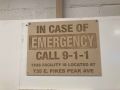 IN CASE OF
EMERGENCY
sign

PPM Fire Escape Plan
- Fire Escape Plan maps are posted throughout the Makerspace.
- There are 7 fire extinguishers on the fire escape plan map.
- Review the PPM Fire Escape Plan for locations.
-
 PPM Emergency
Evacuation Plan.pdf -
 PPM Fire
Prevention Plan.pdf -
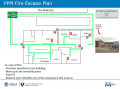 PPM Fire Escape
Plan

First Aid
- There is a FIRST AID Supply Cabinet in our Kitchen Area.
- FIRST AID Kits are available in four areas: the Kitchen, Metal Shop, Wood Shop and CNC Room.
-
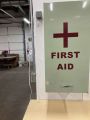 FIRST AID
Supply Cabinet -
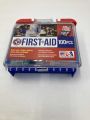 FIRST AID
Kit


Eye Wash Stations
- Emergency Eye & Face Wash Stations are mounted in four areas: the Kitchen, Wood Shop, CNC Room and Vented Room.
-
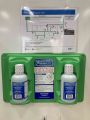 Emergency
Eye & Face Wash
Station

Personal Protective Equipment (PPE)
- Wear protective equipment in all Wood and Metal Shop Areas.
- Wear gloves when using Isopropyl Alcohol and other cleaners.
- Gloves should not be worn when using powered equipment (saws, jointers, drills, or other equipment). Leather gloves can be worn for handling materials, but not when operating machinery.
-
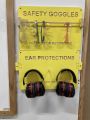 Personal Protective Equipment (PPE)

Hazardous Chemicals
- All hazardous chemicals must be stored in the yellow hazardous chemical storage cabinet located in the Vented Room.
- Review the Safety Data Sheet (SDS) information of unknown products before use.
- SDS information is available via this spreadsheet.
- Do not bring dangerous chemicals to the makerspace.
- Spray paint, stains, and other approved items must be stored in the hazardous chemical storage cabinet in the Vented Room.
- Please DO NOT paint indoors.
-
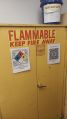 Flammables Cabinet
in the Vented Room

Other Hazards
- Avoid placing uncovered (extension) cords, hoses, cables, or wires across the floors of our shops.
Impairment
- The use of PPM equipment requires you to be alert, attentive, and focused.
- Do not use any PPM work area, or any PPM tools, if you are under the influence of drugs or alcohol.
Classes
- Intro To 3D Printing — class information from Josh Rafail
- To help out in the 3D Printing Area at PPM, use our #3d-printing channel on Slack.
External Training
- Teaching Tech 3D Printer Calibration
- a great resource to calibrate and fine tune your 3d printer
- Ultimate 3D Printing Materials Guide — SIMPLYFY3D
- 44 Common 3D Print Problems — on 3dsourced.com
- RepRap Glossary — common terms and abbreviations
Equipment Lists
(Pikes Peak Makerspace no longer has any LulzBot TAZ printers.)
3D Printers — Level 2
| Picture | Item | Build Volume | Upgrades | Resources |
| 3D Printer
Bambu Lab A1 "Rick" |
AMS Lite
multi filament addition |
website | ||
| 3D Printer
Bambu Lab A1 "Morty" |
AMS Lite
multi filament addition |
website | ||
| 3D Printer
Prusa MK3S |
250x210x200 mm | E3D Revo Hotend 2 Fan Upgrade |
Prusa Upgrades - E3D | |
| 3D Printer
Prusa MK3S |
250x210x200 mm | E3D Revo Hotend 2 fan upgrade |
Prusa Upgrades - E3D | |
3D Printing Equipment — Level 1
| Picture | Item | Manufacturer / Model |
 |
lab oven / dryer
with timer (12"x12"x12" interior) |
Curtin Matheson |
 |
filament dryer box | PPM |
 |
Fume Extractor | PACE
8888-0825 |
 |
IMPULSE HEAT SEALER
12" w cutter |
Midwest Pacific,
MP-12C |
 |
3Doodler create | 3Doodler
STAR TREK |
-
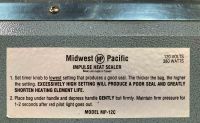 IMPULSE HEAT SEALER
label

Hand Tools
- ☐ Return all tools to their proper location after use. This rule applies to all areas of our Makerspace.
Policies
Red Tags
- If equipment needs repairs, place a Red Tag on it and report it via the Pikes Peak Makerspace Slack channel #red-tag-issues
- This advises others on the malfunctioning equipment and ensures that actions can be taken to service/repair the equipment.
Software
Slicing Software
- PrusaSlicer — prepare (slice) 3D models for 3D printing
Additional Help
Links to related PPM Wiki pages:
Use our PPM Slack channel #3d-printing for FDM or SLA printing questions.
Note that we have a Slack channel (#job-board) for members to post, discuss, or accept job opportunities either within PPM or from the community.
Search the PPM Wiki — include Content pages as well as Multimedia.
Contact Us if you cannot find your answer here on our Wiki or if you notice any outdated information.