Laser — Epilog Zing: Difference between revisions
No edit summary |
|||
| (513 intermediate revisions by 2 users not shown) | |||
| Line 1: | Line 1: | ||
At Pikes Peak Makerspace (PPM), '''our laser engraver/cutters are the most popular tools in the front part of the building.''' | |||
''' | |||
Our Epilog Zing laser requires a reservation to use. | |||
= | <br> | ||
[[File:Level 3 badge.png|alt=Level 3 badge used at Pikes Peak Makerspace|left|frameless|90x90px|PPM TRAINING & CERTIFICATION REQUIRED]] | |||
Our Laser Engraver/Cutter Area at Pikes Peak Makerspace consists mostly of Level 3 equipment. | |||
Additional PPM training and then PPM certification is required to use any of our Level 3 equipment. | |||
<br> | |||
<br> | |||
<br> | |||
{{Template:Contact Us}} | |||
= | <hr style="height:2.5px; background:#D81F2B;"> | ||
<br> | <br> | ||
{{Template:Safety}} | |||
<br> | |||
<hr style="height:2.5px; background:#D81F2B;"> | |||
==Classes== | |||
{{Template:Classes}} | |||
== PPM Training == | |||
Our Zing laser does not require using our T.E.S.L.A. Access system. (Our BOSSLASER and Thunder Laser do.) | |||
===Epilog laser engraver/cutter === | |||
<gallery widths="200" heights="125"> | |||
File:Zing Instruction Sheetv3.pdf|'''Zing Instruction Sheetv3.pdf''' | |||
</gallery> | |||
<br>'''DO NOT cut materials with PVC on any of our lasers,''' this will release chlorine gas which is toxic. | |||
:ALWAYS ensure the work area interior and exterior is clean before and after your work. | |||
:The maximum bed size for vector cutting or raster etching is 16” x 12” or less. | |||
<br>[[Laser Cutting Material Table|'''Laser Cutting Material Table''']] | |||
<br>[[Laser Cutting Acrylic|'''Laser Cutting Acrylic''']] | |||
<br> | <br> | ||
{{Template:Historical}} | |||
'''[[Introduction to the Zing Laser]]''' | |||
'''[https://www.timefracture.org/laser.html Homebrew CO<sub>2</sub> Laser Page]''' — by John Doran (Epilog's VP of Engineering) | |||
==Tips== | |||
:☐ '''"kerf"''' refers to the width of a cut (width of material that is removed). | |||
:☐ The term kerf is also used in woodworking and metalworking (and has the same meaning). | |||
== Equipment Lists== | |||
===Zing LASER=== | |||
{| class="wikitable" | |||
|- style="font-weight:bold; text-align:left; font-family:Arial, Helvetica, sans-serif !important; background-color:#D81F2B; color:#ffffff;" | |||
| style="vertical-align:middle;" |Picture | |||
! | |Item | ||
|Manufacturer /<br>Model | |||
|Resources | |||
|- | |- | ||
|[[File: | |[[File:Zing LASER.jpg|center|frameless|150x150px]] | ||
|''' | |'''zing 30 Watt ''' | ||
'''CO<sub>2</sub> Laser''' | |||
'''Cutter/Engraver''' | |||
[[File:Level 3 badge.png|alt=Level 3 badge|left|frameless|45x45px]] | |||
|'''Epilog Laser''' | |||
10000 Laser System | |||
| | |||
| | |||
| | |||
| | |||
|''' | |||
| | | | ||
|- style="font-weight:bold; text-align:left; font-family:Arial, Helvetica, sans-serif !important; color:#000000;" | |||
| style="vertical-align:middle;" | | |||
| | | | ||
| | | | ||
| | | | ||
|} | |} | ||
=== | ===Equipment Reservations=== | ||
*Reserve 24 Hours in Advance to Guarantee Equipment. | |||
*Reservations are given up after 15 minute no show. | |||
'''If you don't have a reservation:''' | |||
*Be sure your job does not run longer than an upcoming reservation or you are expected to stop your job. | |||
==Policies== | ==PPM Benefits== | ||
{{Member Benefits}} | |||
==PPM Policies == | |||
'''Materials''' | |||
:'''DO NOT cut materials with PVC on any of our lasers,''' this will release chlorine gas which is toxic. | |||
:'''Avoid reflective material.''' (Avoid cutting or engraving compact discs, for example.) | |||
:To donate for "Wood Sheet for Laser" use the Optix app. | |||
{{Red Tags}} | |||
==Related Software== | |||
'''The dedicated computer in our Zing cutter/engraver area has the following software installed, and more:''' | |||
=== | ==='''Design Software'''=== | ||
= | |||
[ | :'''[[Adobe Creative Cloud Tips#Adobe Illustrator Tips|Adobe Illustrator Tips]]''' | ||
:'''[[Adobe Creative Cloud Tips#Adobe Photoshop Tips|Adobe Photoshop Tips]]''' | |||
== | ==='''Printing Software'''=== | ||
:'''Adobe Acrobat''' | |||
=== | == Additional Help== | ||
:Use the PPM Slack channel #laser-cutter | |||
:Note that we have a Slack channel (#job-board) for members to post, discuss, or accept job opportunities either within PPM or from the community. | |||
{{Template:Footer}} | |||
<hr style="height:2.5px; background:#D81F2B;"> | |||
Latest revision as of 16:07, 24 July 2026
At Pikes Peak Makerspace (PPM), our laser engraver/cutters are the most popular tools in the front part of the building.
Our Epilog Zing laser requires a reservation to use.

Our Laser Engraver/Cutter Area at Pikes Peak Makerspace consists mostly of Level 3 equipment.
Additional PPM training and then PPM certification is required to use any of our Level 3 equipment.
Contact Us if you cannot find your answer here on our Wiki or if you notice any outdated information.
Safety First
Members must know the following information:
- In case of emergency, call 911.
- Our physical location is:
- 735 East Pikes Peak Avenue
- Colorado Springs, CO 80903
-
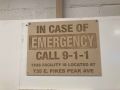 IN CASE OF
EMERGENCY
sign

PPM Fire Escape Plan
- Fire Escape Plan maps are posted throughout the Makerspace.
- There are 7 fire extinguishers on the fire escape plan map.
- Review the PPM Fire Escape Plan for locations.
-
 PPM Emergency
Evacuation Plan.pdf -
 PPM Fire
Prevention Plan.pdf -
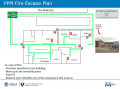 PPM Fire Escape
Plan

First Aid
- There is a FIRST AID Supply Cabinet in our Kitchen Area.
- FIRST AID Kits are available in four areas: the Kitchen, Metal Shop, Wood Shop and CNC Room.
-
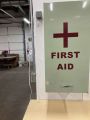 FIRST AID
Supply Cabinet -
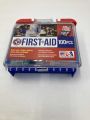 FIRST AID
Kit


Eye Wash Stations
- Emergency Eye & Face Wash Stations are mounted in four areas: the Kitchen, Wood Shop, CNC Room and Vented Room.
-
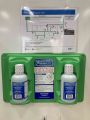 Emergency
Eye & Face Wash
Station

Personal Protective Equipment (PPE)
- Wear protective equipment in all Wood and Metal Shop Areas.
- Wear gloves when using Isopropyl Alcohol and other cleaners.
- Gloves should not be worn when using powered equipment (saws, jointers, drills, or other equipment). Leather gloves can be worn for handling materials, but not when operating machinery.
-
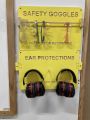 Personal Protective Equipment (PPE)

Hazardous Chemicals
- All hazardous chemicals must be stored in the yellow hazardous chemical storage cabinet located in the Vented Room.
- Review the Safety Data Sheet (SDS) information of unknown products before use.
- SDS information is available via this spreadsheet.
- Do not bring dangerous chemicals to the makerspace.
- Spray paint, stains, and other approved items must be stored in the hazardous chemical storage cabinet in the Vented Room.
- Please DO NOT paint indoors.
-
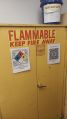 Flammables Cabinet
in the Vented Room

Other Hazards
- Avoid placing uncovered (extension) cords, hoses, cables, or wires across the floors of our shops.
Impairment
- The use of PPM equipment requires you to be alert, attentive, and focused.
- Do not use any PPM work area, or any PPM tools, if you are under the influence of drugs or alcohol.
Classes
Browse and Pay for PPM Classes
PPM Training
Our Zing laser does not require using our T.E.S.L.A. Access system. (Our BOSSLASER and Thunder Laser do.)
Epilog laser engraver/cutter
-
 Zing Instruction Sheetv3.pdf
DO NOT cut materials with PVC on any of our lasers, this will release chlorine gas which is toxic.
- ALWAYS ensure the work area interior and exterior is clean before and after your work.
- The maximum bed size for vector cutting or raster etching is 16” x 12” or less.
Laser Cutting Material Table
Laser Cutting Acrylic
 The following pages contain historical information. The pages are provided for reference only.
Introduction to the Zing Laser
Homebrew CO2 Laser Page — by John Doran (Epilog's VP of Engineering)
Tips
- ☐ "kerf" refers to the width of a cut (width of material that is removed).
- ☐ The term kerf is also used in woodworking and metalworking (and has the same meaning).
Equipment Lists
Zing LASER
| Picture | Item | Manufacturer / Model |
Resources |
 |
zing 30 Watt
CO2 Laser Cutter/Engraver |
Epilog Laser
10000 Laser System |
|
Equipment Reservations
- Reserve 24 Hours in Advance to Guarantee Equipment.
- Reservations are given up after 15 minute no show.
If you don't have a reservation:
- Be sure your job does not run longer than an upcoming reservation or you are expected to stop your job.
PPM Benefits
- PPM members enjoy discounts at the following local merchants:
- (bring proof of PPM membership)
| Website | Benefit | Address |
|---|---|---|
| Woodcraft of Colorado Springs | 10% discount | 4438 Austin Bluffs Parkway |
| CO Lumber Specialties | 10% discount | 3636 Stone Avenue |
| GENERAL AIR | 10% discount | 3031 N Nevada Ave. |
| ACE Hardware Uintah Gardens | 10% discount | 1830 W Uintah Street |
PPM Policies
Materials
- DO NOT cut materials with PVC on any of our lasers, this will release chlorine gas which is toxic.
- Avoid reflective material. (Avoid cutting or engraving compact discs, for example.)
- To donate for "Wood Sheet for Laser" use the Optix app.
Red Tags
- If equipment needs repairs, place a Red Tag on it and report it via the Pikes Peak Makerspace Slack channel #red-tag-issues
- This advises others on the malfunctioning equipment and ensures that actions can be taken to service/repair the equipment.
Related Software
The dedicated computer in our Zing cutter/engraver area has the following software installed, and more:
Design Software
Printing Software
- Adobe Acrobat
Additional Help
- Use the PPM Slack channel #laser-cutter
- Note that we have a Slack channel (#job-board) for members to post, discuss, or accept job opportunities either within PPM or from the community.
Search the PPM Wiki — include Content pages as well as Multimedia.
Contact Us if you cannot find your answer here on our Wiki or if you notice any outdated information.