Laser — BOSS
At Pikes Peak Makerspace (PPM), our two laser engraver/cutters are the most popular tools in the front part of the building.
Our BOSS (LS-3655) laser requires a reservation to use.

Our Laser Engraver/Cutter Area at Pikes Peak Makerspace consists mostly of Level 3 equipment.
Additional PPM training and then PPM certification is required to use any of our Level 3 equipment.
Contact Us if you cannot find your answer here on our Wiki or if you notice any outdated information.
Safety First
Members must know the following information:
- In case of emergency, call 911.
- Our physical location is:
- 735 East Pikes Peak Avenue
- Colorado Springs, CO 80903
-
 IN CASE OF
EMERGENCY
sign

PPM Fire Escape Plan
- Fire Escape Plan maps are posted throughout the Makerspace.
- There are 7 fire extinguishers on the fire escape plan map.
- Review the PPM Fire Escape Plan for locations.
-
 PPM Emergency
Evacuation Plan.pdf -
 PPM Fire
Prevention Plan.pdf -
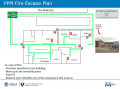 PPM Fire Escape
Plan

First Aid
- There is a FIRST AID Supply Cabinet in our Kitchen Area.
- FIRST AID Kits are available in four areas: the Kitchen, Metal Shop, Wood Shop and CNC Room.
-
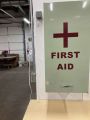 FIRST AID
Supply Cabinet -
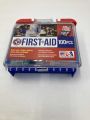 FIRST AID
Kit


Eye Wash Stations
- Emergency Eye & Face Wash Stations are mounted in four areas: the Kitchen, Wood Shop, CNC Room and Vented Room.
-
 Emergency
Eye & Face Wash
Station

Personal Protective Equipment (PPE)
- Wear protective equipment in all Wood and Metal Shop Areas.
- Wear gloves when using Isopropyl Alcohol and other cleaners.
- Gloves should not be worn when using powered equipment (saws, jointers, drills, or other equipment). Leather gloves can be worn for handling materials, but not when operating machinery.
-
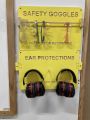 Personal Protective Equipment (PPE)

Hazardous Chemicals
- All hazardous chemicals must be stored in the yellow hazardous chemical storage cabinet located in the Vented Room.
- Review the Safety Data Sheet (SDS) information of unknown products before use.
- SDS information is available via this spreadsheet.
- Do not bring dangerous chemicals to the makerspace.
- Spray paint, stains, and other approved items must be stored in the hazardous chemical storage cabinet in the Vented Room.
- Please DO NOT paint indoors.
-
 Flammables Cabinet
in the Vented Room

Other Hazards
- Avoid placing uncovered (extension) cords, hoses, cables, or wires across the floors of our shops.
Impairment
- The use of PPM equipment requires you to be alert, attentive, and focused.
- Do not use any PPM work area, or any PPM tools, if you are under the influence of drugs or alcohol.
Classes
- The Boss Laser Safety and Certification class is offered twice per month.
PPM Training
- Our BOSSLASER cannot be turned on without scanning the RFID card of a member certified in our T.E.S.L.A. Access system.
Tips
- ☐ "kerf" refers to the width of a cut (width of material that is removed).
- ☐ The term kerf is also used in woodworking and metalworking (and has the same meaning).
General Use
- ☐ Do not accidentally change the brass knobs on the top of the laser as they control the mirror alignment.
- ☐ Weights are no longer allowed to hold down material.
- ☐ Use pins to hold down your material.
- ☐ If not enough pins are available, use Slack to message the Area Contact, or discuss on the #laser-cutter channel.
Cleaning Policies
Clean up after use:
- ☐ Wipe down / dust the inside and outside of lid. Glass cleaner may be used if necessary.
- ☐ Clean out the debris in, on, and around the honeycomb. Vacuum if necessary.
- ☐ Dump out catch tray.
- ☐ Empty small blue trash can if full.
- ☐ Organize computer area.
- ☐ Sweep floor around the boss area.
Always leave the space better than when you found it.
Boss-specific Safety Information
DO NOT cut materials with PVC on any of our lasers, this will release chlorine gas which is toxic.
- ☐ NEVER cut PVC (When in doubt, error on the side of caution)
- ☐ Avoid reflective material (avoid cutting or engraving compact discs, for example)
- ☐ Use only approved materials
- ☐ NEVER leave the laser unattended while it is running (Stay in the building)
- ☐ Leave lid closed for a few moments after your job is completed to allow for proper ventilation
- ☐ Up to 80% power is allowed
- ☐ Ensure the work area interior and exterior is clean before and after your work
- ☐ Keep the exhaust fan and chiller running while the laser is in use
- ☐ Make sure Zing Laser isn’t running before turning off fan
Troubleshooting and Common Issues
- ☐ You should not start your job until you gain confidence about your settings by doing multiple tests.
- ☐ It is a good practice to leave the material and laser head in position for inspection. You can, at that point, attempt another pass through if nothing has been moved.
Auto-focus malfunction? (The bed is not moving during auto-focus, or the bed is moving down during auto focus)
- ☐ The laser head may be sticking. GENTLY press up and down with the palm of your hand until back in place.
- ☐ If that did not fix the problem, please post a message on the PPM Slack channel #laser-cutter.
The laser head is moving and blowing air but the laser is not firing?
- ☐ Make sure the boss chiller has been turned on.
Taking too long?
- ☐ Check settings for “flood fill” or “fill shapes individually”. Use the preview feature to know if that will help.
Equipment Lists
BOSSLASER
| Picture | Item | Manufacturer / Model |
 |
Boss 150 Watt
CO2 Laser Cutter/Engraver |
BOSS /
LS-3655 |
 |
Industrial Water Chiller | S&A /
CW‑5000DG |
 |
Compressor | |
 |
OUTFEED TABLE | |
Equipment Reservations
- Reserve 24 Hours in Advance to Guarantee Equipment.
- Reservations are given up after 15 minute no show.
- If you don't have a reservation:
- Be sure your job does not run longer than an upcoming reservation or you are expected to stop your job.
PPM Benefits
- PPM members enjoy discounts at the following local merchants:
- (bring proof of PPM membership)
| Website | Benefit | Address |
|---|---|---|
| Woodcraft of Colorado Springs | 10% discount | 4438 Austin Bluffs Parkway |
| CO Lumber Specialties | 10% discount | 3636 Stone Avenue |
| GENERAL AIR | 10% discount | 3031 N Nevada Ave. |
| ACE Hardware Uintah Gardens | 10% discount | 1830 W Uintah Street |
- At home LightBurn subscriptions can be purchased at a discounted rate for being a PPM member.
- The discount code is saved as a Pinned Message in our 'laser-cutter' channel in Slack.
PPM Policies
Materials
- DO NOT cut materials with PVC on any of our lasers, this will release chlorine gas which is toxic.
- Avoid reflective material. (Avoid cutting or engraving compact discs, for example.)
- To donate for "Wood Sheet for Laser" use the Optix app.
Red Tags
- If equipment needs repairs, place a Red Tag on it and report it via the Pikes Peak Makerspace Slack channel #red-tag-issues
- This advises others on the malfunctioning equipment and ensures that actions can be taken to service/repair the equipment.
LightBurn Subscriptions
At home LightBurn subscriptions can be purchased at a discounted rate for being a PPM member.
The discount code is saved as a Pinned Message in our 'laser-cutter' channel in Slack.
Please note:
- Your at home subscription is unique to only you.
- You will receive an email from LightBurn with your unique registration key.
- Make note of that key because you will need it again if you renew your subscription.
- PPM does not have access to your registration key.
Related Software
The dedicated computer in our BOSS cutter/engraver area has the following design and printing software installed, and more:
Design Software
Printing Software
- LightBurn Software — home page
Additional Help
- Use the PPM Slack channel #laser-cutter
- Note that we have a Slack channel (#job-board) for members to post, discuss, or accept job opportunities either within PPM or from the community.
Search the PPM Wiki — include Content pages as well as Multimedia.
Contact Us if you cannot find your answer here on our Wiki or if you notice any outdated information.